Object-Oriented Programming with Java · Lecture Notes
Chapter 1.2: Computation and Computational Thinking
A pocket calculator only adds and multiplies. A laptop, on the same day, plays music, simulates circuits and compiles Java. The difference comes less from the power of the hardware than from the fact that the instructions given to the machine can be changed. These notes take up the basic question of what a computer does: what is computation, how is a problem put into a form a computer can solve, and where does that road end? The first sections define programming, computation and computer science. Then the four skills of computational thinking, namely decomposition, pattern recognition, abstraction and algorithm design, are worked through on a single example. The history section runs from punched cards to the stored-program computer. The Turing machine gives an exact definition of computation and shows that not every problem is solvable. The last sections separate declarative from imperative knowledge using the square root and GCD examples, and present algorithms, problem specification, and sequential, conditional and repetitive operations with Java code.
Learning outcomes
- Basic concepts
- Define programming, computation and computer science; explain that computer science is more than technology.
- Computational thinking
- Apply the skills of decomposition, pattern recognition, abstraction and algorithm design to a problem in turn.
- Historical development
- Tell fixed-program from stored-program computers; explain the place of Babbage, Lovelace, the ABC, Colossus, ENIAC, EDVAC and the von Neumann architecture.
- Turing machine
- Run a simple Turing machine step by step with its tape, tape head and rule table; explain the concepts of computability and the halting problem.
- Kinds of knowledge
- Tell declarative (what?) from imperative (how?) knowledge using the square root and GCD examples; trace the Babylonian method and Euclid's algorithm in Java.
- Algorithms and operations
- List the properties of an algorithm and identify the input and output of a problem; recognize sequential, conditional and repetitive operations, and explain the relationship between
repeat … untilanddo … while.
1.2.1Programming and computation
A computer is a helper that works very fast but knows nothing by itself. It performs billions of operations a second, yet it cannot decide on its own which operation to do in which order. That decision is given to it as a written list of instructions. The list is called a program, and the act of writing the list is programming. The job a program carries out is, most of the time, a computation: data is taken in, processed and a result is produced. This section defines the two concepts separately and shows how they come together in a small Java program.
1.2.1.1Programming
Programming is the activity of writing instructions that tell a computer, step by step, what to do. The text formed by these instructions is called a program. The instructions are written in a programming language; Java, Python and C are examples.
A programming language is a bridge between humans and machines. It must be readable for people and exact for machines. In everyday speech, saying "wait a bit" or "pick a suitable number" is enough; the listener fills in the gaps with their own interpretation. A computer makes no such interpretation. If how long to wait or which number to pick is not written out explicitly, it either reports an error or does something wrong. That is why the rules of programming languages are strict: if a single semicolon is missing, a Java program does not compile.
A programmed computer can carry out complex tasks. Smartphones, tablets, laptops, washing machines and cars all work thanks to the programs running inside them. Online shopping, news, communication and education are also products of programs. Computers have entered every field, from home to workplace and from entertainment to education.
One benefit of learning programming also shows in how you think. To get a computer to do a job, you first have to understand that job exactly. Behind a short request like "take the average" lie questions such as how many numbers there are, where they come from and how the result will be written. A person who learns to ask and answer such questions also thinks more systematically when solving problems.
1.2.1.2The role of programming
Programming is a tool for getting computers to perform the tasks we want. Programmers make computers more useful and efficient in every area of life. Three areas illustrate this role well:
- Automation: Smart thermostats measure the temperature and switch the heater on or off. Lighting and security systems come into action by themselves under certain conditions. Robots in factories do the same weld or assembly thousands of times with the same accuracy.
- Health: A pacemaker continuously measures the rhythm of the heart and gives a warning when needed. An MRI scanner produces an image from measured signals; this conversion is a computation from start to finish. Hospital information systems and appointment systems also run on programs.
- Education: Online course platforms, teaching software, and exam and grading systems are products of programmed computers.
Electrical and electronics engineering touches all of these areas. Embedded software loaded onto a microcontroller, a digital filter that cleans up a signal from a sensor, or a control loop that sets the speed of a motor are all written through programming. In such systems the boundary between circuit design and software grows ever thinner.
1.2.1.3Computation
Computation is the process by which a computer or computing device processes data to perform a task. A computation takes data as input, processes it with mathematical operations and logical decisions, and produces a result.
Computation is the basic function of computers. Even drawing a letter on the screen is a computation: the shape, size and position of the letter are turned into numbers, and from these numbers it is computed which pixels will be painted which color. Computation involves three kinds of work. Mathematical operations are operations such as addition and multiplication. Logical decisions check whether a condition is true. Data processing covers general jobs such as sorting, searching and formatting data.
The pattern seen in Figure 1.2.1 is the same in every computation. What changes is the kind of data and the complexity of the operation. A few examples:
- Data analysis: From measurements taken from a temperature sensor over a day, the average, the maximum and the trend are computed; the result is drawn as a chart.
- Simulation: A mathematical model of a circuit or of the weather is built. The computer advances the model in small time steps and predicts how the system will behave.
- Game development: In every frame, the positions of objects are updated by the rules of physics, collisions are checked, and the computer-controlled characters make decisions.
The relationship between programming and computation can be summed up like this: computation is the work being done, and programming is writing the recipe for that work. A well-written program has the same computation done in fewer steps, with less memory and with fewer errors. That is why programming makes computation more effective and efficient.
1.2.1.4The building blocks of computation
Computation has two basic building blocks. The first is mathematics: operations such as addition, subtraction, multiplication and division. The second is logic: decisions are made by evaluating logical expressions. The sentence "If the weather is sunny, go outside" is a logical operation. First the answer to the question "is the weather sunny?" is found; the answer is true or false. Then an action is chosen according to that answer.
The following Java program uses the two building blocks together. It computes the sum and product of two numbers, then decides according to a condition.
public class Computation {
    public static void main(String[] args) {
        int a = 7, b = 3;
        int sum = a + b;     // math
        int product = a * b;     // math
        boolean sunny = true; // logic
        System.out.println("Sum: " + sum);
        System.out.println("Product: " + product);
        if (sunny) {          // decision
            System.out.println("Go outside");
        }
    }
}
When run, the program produces the following output:
Sum: 10
Product: 21
Go outside
The program runs, line by line, as follows:
- The line
public class Computationdefines the program's class. In Java all code is written inside a class, and the file name must match the class name:Computation.java. - The
mainmethod is the entry point of the program. When the Java virtual machine starts the program, it calls this method first. - The line
int a = 7, b = 3;defines two integer variables and gives them their initial values. These are the inputs of the computation. - The
sumandproductlines use the mathematical building block. The expression on the right is evaluated and the result is stored in the variable on the left. - The line
boolean sunny = true;prepares the data for the logical building block. A variable of typebooleancan hold only one of two values:trueorfalse. - The two
printlnlines print the results. In the expression"Sum: " + sum, the+sign appends the number to the text; this is called string concatenation. - The line
if (sunny)makes the decision. Since the condition istrue, the block inside the braces runs and "Go outside" is printed. Had the condition beenfalse, the block would be skipped and the program's output would be only two lines.
1.2.1.5Code trace: the Computation program
The most reliable way to understand what a program does is to trace it by hand. A code trace means reading the program as if executing it line by line, and recording at every step the values of the variables and what is written to the screen. Table 1.2.1 is the trace of the Computation program. Line numbers are counted from the first line of the code: line 1 is the class header, and line 3 is int a = 7, b = 3;.
| Line | a | b | sum | product | sunny | Output (new line) |
|---|---|---|---|---|---|---|
| 3 | 7 | 3 | ||||
| 4 | 7 | 3 | 10 | |||
| 5 | 7 | 3 | 10 | 21 | ||
| 6 | 7 | 3 | 10 | 21 | true | |
| 7 | 7 | 3 | 10 | 21 | true | Sum: 10 |
| 8 | 7 | 3 | 10 | 21 | true | Product: 21 |
| 9 | 7 | 3 | 10 | 21 | true | (condition true) |
| 10 | 7 | 3 | 10 | 21 | true | Go outside |
a = 7 and b = 3 are stored; the other boxes are still empty. (b) Line 5: a * b = 21 is computed. (c) Line 10: since sunny is true, the "Yes" branch of the decision box is chosen and "Go outside" is printed.Two details in the trace deserve attention. First, once a variable receives a value it keeps it until a new assignment comes; in the table, a and b do not change from start to finish. Second, nothing is printed at line 9. Only the condition is evaluated on this line and the path to follow is determined. The result of the decision shows up on the next line. In this way the program shows the three stages of computation in order: data was taken in, processed, and a result produced.
Forgetting the order of operations in string concatenation. The line System.out.println("Sum: " + a + b); prints "Sum: 73", not "Sum: 10". Java evaluates the expression from left to right: first "Sum: " + a is concatenated, forming the string "Sum: 7", and then b is appended to it. To add the numbers first, parentheses are needed: "Sum: " + (a + b).
1.2.2Computer science
The name "computer science" can be misleading. The name suggests that the field is about the machine called the computer. Yet the real subject of the field is not the machine but the problems the machine solves, and the ways of solving those problems.
1.2.2.1More than technology
Computer science is the discipline that studies how information is processed, stored and transmitted, and investigates ways of defining and analyzing problems and producing effective solutions to them.
Computer science does not consist merely of technical knowledge about computers; it is also a discipline concerned with problem-solving skills. Technology is a tool in this discipline. The main aim is to solve problems and to understand information better. A frequently quoted analogy makes this clear: computer science is about computers as much as astronomy is about telescopes. The telescope is a tool for studying the sky; the computer is a tool for solving problems.
This view has a practical consequence. The details of a programming language or a development environment change in a few years. The ability to break a problem into pieces, choose the right data structure and test the correctness of a solution does not change. In this course you learn Java, but the way of thinking behind Java carries over to other languages.
1.2.2.2Three pillars: logic, problem solving, creativity
Computer science rests on three skills:
- Logic: The ability to evaluate data and draw correct conclusions. It forms the foundation of writing programs. The condition of an
ifstatement, when a loop stops, whether two conditions are joined with&&or||are all questions of logic. - Problem solving: The skill of defining and solving complex problems. Every problem is solved with a logical sequence of steps. Finding that sequence is the hardest and most instructive part of programming.
- Creativity: Makes new and innovative solutions possible. The same problem can have many different solutions. The GCD of two numbers can be found by trying all the numbers one by one, or by Euclid's algorithm; both give the same result, but for large numbers one is much faster than the other.
These three skills are not taught separately; they develop together as you program. Logic is used when debugging a program, problem solving when designing its parts, and creativity when looking for another way at a point where you are stuck.
1.2.2.3Technology and social responsibility
Computer science leads us to think about how technology can help people and contribute to solving social problems. It helps us understand and improve the world. It also stresses the responsibility of putting technology at the service of humanity. That is why the field is interesting not only to those concerned with technology but to anyone who wants to develop problem-solving and thinking skills.
The areas of application are very wide: medicine, economics, astronomy, biology, energy, transport and disaster management are only a few. After an earthquake, damage assessment is sped up by programs that process satellite images. Load balancing in an electrical grid is done with models that forecast consumption.
This breadth comes at a price: the programs we write affect real people. A bug in hospital software can lead to a wrong drug dose, and failing to protect personal data can cause serious harm. A programmer's responsibility does not end when the code compiles; it includes making sure the code works correctly and does not harm its users.
1.2.2.4The topics of computer science
Computer science aims to understand, model and analyze reality. Algorithms and code are used to solve problems. Three broad themes stand out within the field:
- Abstraction: Hiding the unnecessary details of a complex system and keeping its essence. A metro map is a good example. The map does not show streets, buildings or real distances; it shows only the stations and the lines. That is what the passenger needs to know: which station to board at and where to change.
- Problem solving: Breaking the problem into parts, solving each part step by step, and combining the solutions.
- Art and design: Computer science is not limited to logic and analytical thought. Digital media, electronic music, games and animation are also products of the field.
Abstraction and problem solving are also two of the legs of computational thinking. Pattern recognition and algorithm design complete the pair, and the four skills together form a working method.
1.2.3Computational thinking
The hardest part of writing a program is often not remembering the rules of Java. The real difficulty comes before the first line of code is written. What does the problem ask, and what parts does it consist of? What information is needed and what is unnecessary? In what order will the parts be solved? The habit of looking systematically for answers to these questions is called computational thinking.
1.2.3.1Definition
Computational thinking is a way of expressing a problem and its solution so that a person or a computer can carry it out step by step. It rests on four skills: decomposition, pattern recognition, abstraction and algorithm design.
The term was popularized in 2006 by a short article by Jeannette Wing. Wing argued that this way of thinking is needed not only by computer scientists but by everyone, and counted it as a basic skill like reading, writing and arithmetic. The four-skill breakdown is a framework widely used in schools and universities to teach this idea.
Computational thinking does not mean "thinking like a computer". A computer does not think; it only executes instructions. Computational thinking is a person's ability to make a problem explainable to a computer. The same skill is useful without a computer. Writing a recipe, deciding the order of measurements to test a circuit, or making a study plan for an exam can be organized with the same four steps.
Seeing the four skills on a single problem is more instructive than defining them one by one. The example problem throughout this section is: finding the grade average of the students in a class.
1.2.3.2Decomposition
Decomposition is breaking a large and complex problem into small subproblems that can each be solved separately.
The request "find the grade average" looks like a single step, but for a computer it consists of four separate jobs:
- Read the grades.
- Add up the grades.
- Divide the sum by the number of grades.
- Write the result.
Each subproblem is easy on its own. An input statement is enough for reading, a loop for summing, a single operation for dividing, and println for writing. This is where the power of decomposition comes from: a hard problem turns into a combination of easy problems.
Decomposition is not done once and left. If a subproblem is still large, it is split too. The step "read the grades" can be broken down further depending on whether the grades come from the keyboard, from a file or from a database. In Java each subproblem often corresponds to a separate method. Large programs are built this way: classes and methods are the traces decomposition leaves in code.
The counterpart of decomposition in electronics is the block diagram. When designing an audio amplifier, you first separate blocks such as the preamplifier, the tone control and the power stage; each block is designed and tested separately, then combined. The methods in a program can likewise be written and tried out one by one.
1.2.3.3Pattern recognition
Pattern recognition is seeing similarities among subproblems, or between a problem and other known problems. If a job is found to repeat in the same form, a single solution is applied to all of it.
In the grade average example the pattern is clear. Reading the first grade and adding it to the sum is the same job as reading the second grade and adding it to the sum; only the grade differs. For a class of thirty students, there is no need to write this step thirty times separately. The repeating step is written once and put in a loop. In programming, pattern recognition often leads to the idea "there is a loop here".
Patterns are looked for not only inside a single problem but also between problems. Averaging grades and averaging a sensor's temperatures over a day are the same problem: take the sum of a list of numbers and divide it by the number of elements. A solution written for one fits the other with a small change. The Babylonian method and Euclid's algorithm also have a repeating step: one improves a guess, the other computes a remainder. Both repeat the step until a certain condition is met.
Pattern recognition grows with experience. A programmer who has solved many problems can say of a new one, "this is a find-the-maximum problem" or "this is a merge-two-lists problem". Reducing a problem to a recognized pattern is much faster than finding the solution from scratch.
1.2.3.4Abstraction
Abstraction is discarding the details that are not needed to solve a problem and keeping only the important properties.
There is a lot of information about a student: name, number, date of birth, hometown, absences, grades. Most of it is unnecessary for computing an average. The student's name or number does not affect the average. Only two pieces of information are needed: the grades and the number of grades. After abstraction, the problem stops being "the average of thirty students" and becomes "the average of a list of numbers". This is a more general problem, and its solution can be used elsewhere too.
The metro map example shows the same idea: the map is not a shrunken photograph of the real city; everything except the information the passenger needs has been thrown away. A good abstraction requires being sure that the discarded detail really is unnecessary. If the grades have different weights, for example if the midterm is 40% and the final 60%, the abstraction "the grades alone are enough" is wrong; the weights must also enter the model.
Abstraction is also the foundation of object-oriented programming. When designing a Student class in Java, not all the properties of a real student but only the properties the program needs are put into the class as fields. A registration system needs a name and a number, a grading system needs grades. The same real entity is abstracted differently in different programs.
1.2.3.5Algorithm design
Algorithm design is writing the solution as finite, clear and ordered steps. The resulting list of steps is precise enough for a person to follow by hand or to be translated into a programming language.
The previous three skills prepare the problem; algorithm design writes the solution. For the grade average, the algorithm in the pseudocode style used in the slides is:
set total to 0
for each grade in grades do
    set total to total + grade
set avg to total / n
print avg
These steps bring together the four subproblems of decomposition, the loop found by pattern recognition, and the two pieces of information abstraction left behind (the grades and n). Every step is clear: there is no room for interpretation about what is to be done. The number of steps is finite: the loop runs once for each grade in the list and stops when the list ends.
Some details are also settled while writing an algorithm. Why does the total start at 0? Because before any grade has been added the total is zero, and each grade is added to that value. What happens if the list is empty? n = 0 and the division is undefined. A well-designed algorithm thinks about this case too; for example, it adds a step such as "if the list is empty, print 'no grades'".
1.2.3.6All four skills together: the grade average
Table 1.2.2 summarizes what the four skills correspond to in the example problem.
| Skill | The question it asks | Counterpart in the grade average |
|---|---|---|
| Decomposition | What parts does the problem consist of? | Read, add, divide, write. |
| Pattern recognition | Is there a repeating or familiar job? | Adding each grade to the sum is the same step: a loop. |
| Abstraction | What information is needed, and what is not? | Name and number are unnecessary; the grades and the number of grades are necessary. |
| Algorithm design | In what steps and in what order is the solution carried out? | total ← 0; for each grade total ← total + grade; avg ← total / n. |
Once the algorithm is ready, translating it into Java is easy. The following program keeps the grades in an array and computes the average. The grades are 40, 75 and 90, taken from the slides' example problems.
public class Average {
    public static void main(String[] args) {
        int[] grades = {40, 75, 90};   // input: grades only
        int total = 0;
        for (int grade : grades) {        // same step for each grade
            total = total + grade;
        }
        double avg = (double) total / grades.length;
        System.out.println("Average: " + avg);
    }
}
The program prints "Average: 68.33333333333333". Each part of the code corresponds to a skill. The grades array is the result of abstraction: not students but only grades are kept. The for loop is the repeating step that pattern recognition found. The addition and division lines are the subproblems of decomposition. And the whole code is the Java counterpart of the algorithm.
| Step | grade | sum | Explanation |
|---|---|---|---|
| Start | – | 0 | No grade has been added yet. |
| Iteration 1 | 40 | 40 | 0 + 40 |
| Iteration 2 | 75 | 115 | 40 + 75 |
| Iteration 3 | 90 | 205 | 115 + 90; the list is finished and the loop exits. |
| Division | – | 205 | avg = 205 / 3 = 68.333… |
The (double) cast in the division line is important. total and grades.length are both of type int. When Java divides two int values it gives an int result and discards the fractional part: 205 / 3 = 68. Once (double) total is written, the dividend is converted to a floating-point number and a true division is carried out. This detail is the kind of thing abstraction can overlook: the algorithm is correct on paper, but if Java's number types are not taken into account the program gives a wrong result.
In a laboratory, the voltage across a resistor is measured every second for an hour. The task is to find the largest value of the measurements and the number of measurements exceeding 5 V. The four skills are applied in turn.
Decomposition: read the measurements; find the maximum; count those above 5 V; write the two results. Pattern recognition: finding the maximum and counting are each a step repeated for every measurement; both can be done in the same loop. Also, "finding the maximum" is a recognized pattern. Abstraction: the time of the measurement, the name of the laboratory and the color of the resistor are unnecessary; all that is needed is a list of 3600 voltage values. Algorithm design: maxVal ← first measurement, count ← 0; for each measurement, if the measurement is greater than maxVal then maxVal ← measurement, and if the measurement is greater than 5 then count ← count + 1; at the end write the two values.
Initializing maxVal with the first measurement rather than 0 is a deliberate choice. If all the measurements were negative, an algorithm starting from 0 would wrongly find 0.
Skipping the computational thinking steps and starting to write code right away. Code written without decomposing the problem usually turns into a single long main method; when an error occurs, it is impossible to find which part is responsible. Code written without abstraction also deals with unnecessary data or forgets a needed piece of information (for example, the grade weights).
1.2.4The history of the computer
Today's computer is the product not of a single invention but of a development lasting several centuries. This development revolves around two ideas. The first is having a machine do the computing: the line running from gears to vacuum tubes and then to transistors is the product of this idea. The second is being able to change what the machine does: the shift from fixed-program machines to stored-program machines is the product of this idea. The details of history are easier to remember when placed along these two lines.
1.2.4.1What is a computer?
A computer is a device that carries out a series of computations and instructions. The instructions let the computer perform a task. A computer uses mathematical computations and logical instructions to process data.
Today's computers work with electronic circuits and represent numbers digitally. They consist of four main components:
- Processor (CPU, central processing unit): Executes instructions and performs computations.
- Memory (RAM, random access memory): Holds the running program and its data. Its content is erased when the power goes off.
- Storage: Units such as disks and SSDs store data permanently. Data is not lost when the computer is turned off.
- Input/output devices: The keyboard, mouse, screen, printer and network connection let the computer communicate with the outside world.
When a Java program runs, all of these components are involved. The .java and .class files sit on disk. When the program is started, it is loaded into memory. The processor executes the instructions one by one. println sends the result to the screen, that is, to an output device. The difference between memory and storage matters to the programmer too: a value held in a variable is lost when the program ends, and data that must persist has to be written to a file.
1.2.4.2Electronic and digital
Two adjectives describe today's computer: electronic and digital. They describe different things.
- Electronic: The computer processes data with electric current. Transistors do the switching in place of mechanical gears. Since there are no moving parts in the switching, operations are very fast.
- Digital: Data is represented with 0 and 1. Each 0 or 1 is a bit; 8 bits make a byte. A byte can take 28 = 256 different values.
Figure 1.2.4 shows why digital representation is preferred. In an analog signal, every voltage value carries different information. So a little noise mixed into the signal changes the information. In a digital signal there are only two levels. In a 5 V system, both 3.9 V and 4.8 V count as "1". Even if noise shifts the signal a little, it is easy to tell which level it is at. The reliability of digital systems comes from this. The logic gates familiar from electronics courses are circuits that work with these two-level signals.
1.2.4.3The fixed-program computer
A fixed-program computer is a machine designed to solve a specific problem and to run a single predefined program. The program is built into the structure of the machine; to make it do another job, the machine itself has to be changed.
The roots of fixed-program machines go back a long way:
- The abacus and the Antikythera Mechanism (2nd century BC). The Antikythera Mechanism is an ancient Greek device that computed the positions of celestial bodies with gears.
- The Pascaline (Blaise Pascal, 1642) and Leibniz's stepped reckoner (1673).
- Babbage's Difference Engine (1822) and Hollerith's electric tabulating machine (1890). Hollerith's machine was built to count the results of the US census from punched cards.
- The Atanasoff–Berry Computer (ABC) and the Turing Bombe. The Bombe was built in World War II to break the German Enigma cipher.
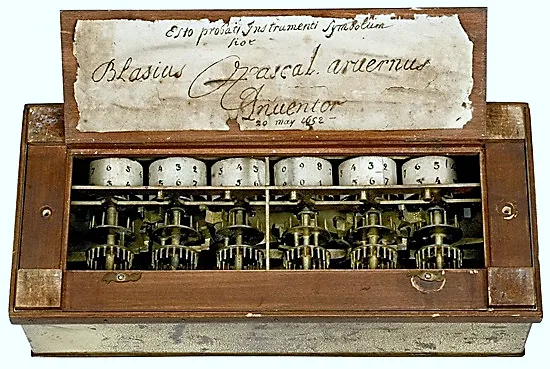
The Pascaline in Figure 1.2.5 is a typical example of a fixed-program machine. Its wheels are arranged to do addition; another computation, such as a square root, cannot be done on this machine. Fixed-program devices exist today too: a simple pocket calculator, or the old-style mechanical programmer of a washing machine, works on the same logic. Fixed-program machines laid the foundations of computer science, inspired technological progress and were the forerunners of modern computers.
1.2.4.4Babbage and the Analytical Engine
Charles Babbage (1791–1871) was an English mathematician and inventor. The Difference Engine was a fixed-program machine designed to compute tables of values of polynomial expressions. Babbage later turned to a far more ambitious design. In 1837 he designed the Analytical Engine. This was the first design for a general-purpose, programmable computer.
The Analytical Engine could do mathematical computation and store results. Its real novelty was that it could be programmed for different computations. The parts of today's computer were already in this design:
- the store: the memory that holds the numbers;
- the mill: the unit that carries out the operations, the counterpart of today's processor;
- input by punched cards and output by a printer.
The punched card idea was borrowed from the weaving loom. In 1804 Joseph Marie Jacquard had developed a loom whose patterns were set by punched cards. When the cards were changed, the pattern changed. Babbage applied the same idea to computation: when the cards were changed, the computation would change. To change what the machine did, it was enough to change the cards, not the machine.
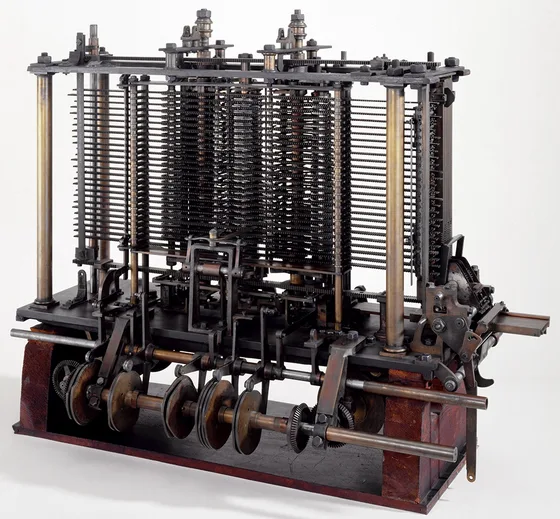
The machine could not be completed in Babbage's lifetime. The metalworking of the day was not up to producing thousands of precision parts, and the money could not be found. Today only trial models exist, like the one in Figure 1.2.6. Still, the Analytical Engine is regarded as the forerunner of modern computers, because it was the first to define clearly what parts a general-purpose machine must consist of.
1.2.4.5Ada Lovelace and the first program
Ada Lovelace (1815–1852) was an English mathematician and writer. In 1843 she translated into English a French article by the Italian engineer Luigi Menabrea about the Analytical Engine, and added her own notes to the translation. The notes were longer than the article itself.
The most famous of the notes is "Note G". In it Lovelace gave a step-by-step method for the machine to compute Bernoulli numbers. The method is a table showing which value is to be written to which memory cell and which operation is to be done in which order. This table is regarded as the first computer program, and Lovelace is counted as the first programmer in the history of computing. Lovelace combined a scientific approach with mathematical thinking in programming.
Lovelace's foresight went beyond the program. She was among the first to notice that the machine could work not only with numbers but with symbols. In her view, if musical notes were also represented by symbols, the machine could compose music. Today's computers processing text, sound and images is the realization of this idea. Lovelace's legacy also gave its name to a programming language: the Ada language, introduced in 1980, bears her name.
This story has a lesson: Lovelace's program was written when the machine did not yet exist. An algorithm is not tied to a machine; it can be designed on paper and followed by hand. The code traces made throughout these notes rest on the same idea.
1.2.4.6Timeline and the stored program
About a century lies between Babbage and the first electronic computers. Figure 1.2.7 shows the important dates of this period together.
The timeline divides into three periods:
- The mechanical period: Gears and cards. The Pascaline, the Difference Engine and the Analytical Engine belong to this period.
- The theoretical foundation: In 1936 Alan Turing defined exactly what the concept of "computable" means and put forward the idea of the universal machine. This work built no machine; it determined what a machine can and cannot do.
- The electronic period: The vacuum-tube ABC, Colossus and ENIAC; then the stored-program EDVAC.
The most important step of the electronic period is the stored-program idea.
A stored-program computer is a computer that keeps the program in memory just like data. Changing the program means writing a new program into memory; the structure of the machine is left untouched.
The importance of the idea in 1945 lies here: since the program and data sit in the same memory, a program is also data. One program can read, modify or produce another program as input. Compilers do exactly this: javac reads a Java source file as input and produces another program as output. The Java virtual machine likewise reads the program in a .class file as data and runs it.
The von Neumann architecture is a computer organization in which instructions and data are kept in the same memory. The processor reads instructions from memory in order and executes them. The processor, memory and input/output units communicate over address, data and control paths (the bus).
The laptops, phones and servers in use today work basically on this architecture. In a loop, the processor fetches the next instruction from memory, decodes it and executes it; then moves on to the next one. A conditional jump instruction can change this order. The if and while statements in Java turn into jump instructions of this kind after compilation.
1.2.4.7The first electronic computers: ABC and Colossus
The Atanasoff–Berry Computer (ABC) is the machine developed by John Atanasoff and Clifford Berry between 1937 and 1942 at Iowa State University. It is regarded as the first electronic digital computer. The features of the ABC are as follows:
- Its logic circuits were built with vacuum tubes.
- It processed numbers in the binary (0/1) system.
- Its memory consisted of capacitors on rotating drums. A capacitor being charged or empty represented one bit.
- It could not be programmed. It only solved systems of linear equations; that is, it was a fixed-program machine.
Colossus Mark 1 is the machine that Tommy Flowers and his team built in 1944 at Bletchley Park in England. It is regarded as the first programmable electronic digital computer; it was programmed with switches and plugs. It was used in World War II to break the enemy's encrypted messages. It contained about 1600 vacuum tubes and was far faster and more flexible than mechanical devices. Colossus contributed greatly to the progress of computer technology; however, since it was kept secret for many years after the war, its influence was understood late.
The difference between the two machines sums up the main line of history. The ABC was electronic and binary, but tied to a single job. Colossus was programmable, but changing the program meant changing the switches and plugs by hand. It took a few more years before the program was held in memory.
1.2.4.8The vacuum tube and the transistor
The common component of the first electronic computers is the vacuum tube. A vacuum tube is a glass tube with the air pumped out. It contains three main elements:
- Cathode: Emits electrons when heated.
- Anode (plate): Collects the electrons the cathode emits.
- Grid: Sits between the cathode and the anode. A small voltage applied to the grid switches the electron flow on or off.
Being able to switch the current on and off with the grid voltage makes the tube an electronic switch: 1 if current flows, 0 if not. Since this switching involves no moving parts, it is thousands of times faster than mechanical relays. A relay opens and closes within milliseconds, while a tube switches on the order of microseconds.
The drawbacks of the vacuum tube were also large. Tubes get very hot, use a lot of energy and fail often. In a machine with thousands of tubes, a few burning out every day was normal. The solution was the transistor, invented in 1947. The transistor does the same switching job far smaller, cooler and more reliably. The MOSFETs studied in electronics courses do this job too. Today's processors contain billions of transistors.
1.2.4.9ENIAC and EDVAC
ENIAC (1946) is the machine built by John Mauchly and J. Presper Eckert at the University of Pennsylvania (USA). It is regarded as the first large-scale general-purpose electronic computer. It used about 17,500 vacuum tubes instead of mechanical parts, so it was much faster than earlier machines. It could do about 5000 additions per second. It was used for large computations such as artillery firing tables.
ENIAC had two weak points. It held numbers in the decimal system, which complicated its circuits. More importantly, to change the program the cables had to be replugged by hand. Preparing the machine for a new problem could take days.
EDVAC (1949–1951) solved these two problems. Its design was described in a report John von Neumann wrote in 1945; the machine became fully operational in 1951. The innovations of EDVAC are as follows:
- Unlike ENIAC, it used the binary number system.
- It stored the program and the data in the same memory. This is the implementation of the stored-program idea.
- Instructions ran in sequence; conditional jumps were possible.
This design is the von Neumann architecture, the basis of today's computers. What separates ENIAC from EDVAC is not speed but where the program sits. In ENIAC the program was in the cables; in EDVAC it was in memory.
1.2.4.10The general-purpose computer
A general-purpose computer is a computer that can be programmed according to the user's needs and is designed for a wide range of applications. It consists of a processor, memory and input/output units; the processor processes data according to instructions and produces results.
The general-purpose computer is used in many fields such as business, education and entertainment. It is adapted to different tasks by changing the program: the same laptop plays music a minute ago and compiles Java a minute later. This is its difference from a fixed-program machine. General-purpose computers automate business processes, speed up scientific computation and make communication easier.
| Property | Fixed-program | Stored-program |
|---|---|---|
| Where the program is | In the structure of the machine (gears, wires, circuits) | In memory, like data |
| Changing the program | Rebuilding the machine | Loading a new program into memory |
| What it can do | A single job | Any job that can be programmed |
| Examples | Pascaline, Difference Engine, ABC | EDVAC, today's computers |
1.2.4.11The first programs and Fortran
The first programs were mostly for mathematical computations. Uses focused on scientific and military applications: firing tables, nuclear physics calculations, weather forecasting. Programs and data were entered with punched cards. The pattern of holes in each column of a card encoded one character.
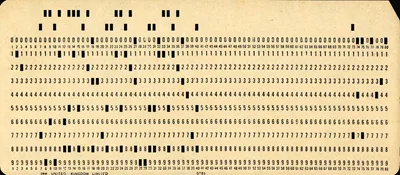
A card like the one in Figure 1.2.9 held 80 characters. A program of a hundred lines was a deck of a hundred cards. If the deck was dropped and the cards got shuffled, the program was ruined. The 80-character line limit seen in some code editors today is a leftover from this period.
The first programs were written in machine language or very close to it. Since every processor has different instructions, a program written for one machine did not run on another. Fortran (Formula Translation), the first widely used high-level programming language, eased this problem. Fortran was developed at IBM under the leadership of John Backus and released in 1957. It was widely used in scientific computing and is still used in that area today.
A high-level language lets the programmer write expressions close to mathematics such as K = I + J. A compiler translates this expression into machine instructions. The programmer now thinks in terms of variable names rather than memory addresses. Java (1995) is also a high-level language; the line int sum = a + b; continues this tradition.
1.2.5Turing machines
The word "computation" has a vague meaning in everyday language. What does it mean to say that a problem is "solvable by computer"? With which computer, how much memory, which language? In 1936 Alan Turing defined an extremely simple abstract machine to answer this question independently of all machines. This machine is not fast or practical like a real computer. Its value comes from defining exactly what computation is.
1.2.5.1The universal Turing machine
A universal Turing machine is an abstract Turing machine that takes as input the description of another Turing machine together with that machine's input, and then simulates that machine.
This model, defined by Alan Turing in 1936, is an abstract model of a general-purpose computer and one of the most fundamental models of computer science. The universal machine can do whatever any Turing machine given to it can do. It can therefore solve every computable problem.
The universal machine idea is the theoretical counterpart of the stored-program idea. In Figure 1.2.10, the description of the machine to be simulated is read like the other data on the tape. Today's computers work the same way: a single piece of hardware becomes a text editor, a game or a compiler depending on the program in memory. This is the theoretical basis of the universal programmability of modern computers. The stored-program computer and the universal Turing machine are two important turning points of computer technology: one determined how to build the machine, the other what it can do.
1.2.5.2The parts of a Turing machine
A Turing machine is an abstract model of computation made of three parts:
- Tape: A strip of infinite length divided into cells. The input, output and intermediate results are stored on the tape. Each cell holds a symbol (0, 1, blank □ …).
- Tape head: At any moment it points to a single cell. It reads the symbol in that cell, writes a new symbol in its place and moves one cell left or right.
- State and rules: The machine's current state (q0, q1, …) together with the symbol read determines what to write, where the head moves and the next state.
The rule format is as follows:
(state, read) → (write, move, new state)
For example, the rule (q0, 0) → (1, right, q0) means: when the machine is in state q0 and there is a 0 under the head, a 1 is written to that cell, the head moves one cell right and the machine stays in state q0. If this rule is applied to the snapshot in Figure 1.2.11, cell 1 becomes 1 and the head moves to cell 2.
Every step of the machine is this simple: read a symbol, write a symbol, move one cell, change the state. All operations such as addition, multiplication and comparison are built from long sequences of these simple steps. Since the tape is infinite, there is no memory limit. This is also its difference from real computers: a real computer's memory is finite.
The components of a Turing machine can be likened to those of a Java program. The tape is the memory where data is kept; the head points at the variable currently being worked on; the rule table is the program; and the state is which line the program is currently at. The analogy is not perfect, but it helps one see that a Turing machine, too, runs a program.
1.2.5.3Example: a machine that flips bits
One of the simplest Turing machines is the one that turns every 0 on the tape into 1 and every 1 into 0. The machine has only one working state (q0) and three rules. The rules are given in Table 1.2.5.
| # | State, read | Write, move, state |
|---|---|---|
| 1 | q0, 0 | 1, right, q0 |
| 2 | q0, 1 | 0, right, q0 |
| 3 | q0, □ | halt |
By the rules, if 0 is read, 1 is written, and if 1 is read, 0 is written, and in both cases the head moves one cell right. When it reaches a blank cell, the machine halts. Let us run the machine with 0110 written on the tape. Initially the state is q0 and the head is at cell 0. Table 1.2.6 shows each step.
| Step | Tape (before) | Head | Read | Rule | Tape (after) |
|---|---|---|---|---|---|
| 1 | 0110□ | 0 | 0 | 1: write 1, right | 1110□ |
| 2 | 1110□ | 1 | 1 | 2: write 0, right | 1010□ |
| 3 | 1010□ | 2 | 1 | 2: write 0, right | 1000□ |
| 4 | 1000□ | 3 | 0 | 1: write 1, right | 1001□ |
| 5 | 1001□ | 4 | □ | 3: halt | 1001□ |
The machine runs four writing steps and one halting step, five steps in total. The tape ends up holding 1001. The number of steps depends on the length of the input: for an input of n bits, the machine runs n writing steps and one halting step, that is, n + 1 steps.
This small rule table is the machine's program. The universal machine can read such a table from its tape and run it. The same idea can be written in Java with a loop: for each element of an array, if the element is 0 make it 1, if it is 1 make it 0, and move on to the next element. The "move right" step in the Turing machine corresponds to incrementing the index in the loop; halting at a blank cell corresponds to leaving the loop at the end of the array.
Let the same machine run on the tape 1010. The steps: in cell 0, 1 is read and 0 is written (0010); in cell 1, 0 is read and 1 is written (0110); in cell 2, 1 is read and 0 is written (0100); in cell 3, 0 is read and 1 is written (0101); in cell 4, □ is read and the machine halts. There are 4 writing steps and 1 halting step in total, that is, 5 steps. The tape ends up holding 0101.
Forgetting the halting rule. If the table contained only the first and second rules, the machine would not know which rule to apply on reaching a blank cell. In this undefined situation the machine gets stuck; it hangs without producing a correct result. Forgetting the termination condition in a Java loop is a similar mistake: the loop runs past the end of the array and an ArrayIndexOutOfBoundsException is thrown.
1.2.5.4Computability and the halting problem
The Turing machine defines exactly what computation is and what its limits are. The claim that has made this definition accepted is the Church–Turing thesis.
Anything that can be computed by a step-by-step method can also be computed by a Turing machine.
Although it is given in a theorem box, the Church–Turing thesis is not a proven mathematical theorem. "A step-by-step method" is an intuitive notion and has no exact mathematical definition. The thesis claims that this intuitive notion is captured exactly by the Turing machine. None of the models of computation proposed so far has turned out to be more powerful than the Turing machine; this is why the thesis is generally accepted.
A problem is called computable if there is an algorithm (equivalently, a Turing machine) that gives the right answer for every input in a finite number of steps. Computability is the question of whether a problem can be solved by any algorithm at all.
The really surprising result of Turing's 1936 paper is that not every problem is computable. The most famous example is the halting problem: when a given program is run on a given input, does it eventually stop, or does it run forever? Turing proved that there can be no algorithm that answers this question correctly for every program.
The idea of the proof rests on constructing a counterexample and can be told in a few sentences. Suppose a method named halts(p, x) could be written. Let this method return true if program p stops when run on input x and false if it does not, and let it always stop itself. Using this method, a new program, trouble(p), is written. trouble asks the question halts(p, p): if the answer is true it enters an infinite loop, and if false it stops at once. Now let the program trouble be run on its own source code. If trouble(trouble) stops, then halts(trouble, trouble) returns true and trouble enters an infinite loop; that is, it does not stop. If it does not stop, halts returns false and trouble stops at once; that is, it stops. Both cases lead to a contradiction. The only source of the contradiction is the assumption that the halts method can be written; so no such method can be written.
This result has a practical meaning. The Java compiler notices some obvious infinite loops, but a compiler that finds every infinite loop cannot be written. Nor is there a general tool that automatically shows that a program stops on every input. The limit comes not from speed or memory but is a logical one. A faster computer cannot get past this limit. This result is regarded as one of the most important scientific results of the 20th century.
1.2.5.5Turing completeness and Java
A programming language or system that can do every computation a Turing machine can do is called Turing complete.
Languages such as Java, Python and C are Turing complete. They can do every computation a Turing machine can. For this it is enough for a language to have conditional branching, unbounded repetition (a loop or recursion) and the ability to hold as much data as desired. Languages differ from one another in speed and convenience, not in power. Any computation that can be written in Java can be written in Python as well; only one may be shorter and the other faster.
One consequence of this equivalence is that the choice of language is not a question of "power". The reasons for choosing Java for a project are engineering ones such as type checking, portability and the richness of libraries. The halting problem also holds for all Turing-complete languages: in Java, too, no program can be written that decides whether every program halts.
1.2.6The limits of computers
The halting problem is the logical limit of computation: no computer can get past it. Besides this there are more everyday limits too. Even a computable problem cannot be solved in practice if the time or memory it needs exceeds what is available. This section covers the limits of physical resources and how these limits show up in a Java program.
1.2.6.1Resource limits
Computers do complex computations very fast; this power rests on technological progress. Even so, every resource is limited:
- Processor speed: Determines how fast computations are done. Today's processors perform billions of operations a second, but this number is finite too. An algorithm whose number of steps grows very fast with the input can take years even on the fastest processor.
- Memory: The capacity to store data. More memory means more complex tasks, but memory is limited too. The tape of a Turing machine is infinite; the memory of a real computer is not.
- Data processing capacity: Processing large data sets takes time and resources. Even reading millions of records is limited by the speed of the disk.
- Energy: Computers consume energy, which is a limited resource. A more powerful computer means more energy. Large data centers can use as much electricity as a small town.
Programmers try to get past these limits by using resources efficiently: they choose algorithms that do the same job in fewer steps and with less memory. The difference between trying every number one by one to find the GCD and using Euclid's algorithm is a good example of this choice.
1.2.6.2The limits show up in Java too
Since a computer's memory is finite, every number type is also stored with a finite number of bits. This limit sometimes leads to unexpected results. The following program shows three typical cases.
public class Limits {
    public static void main(String[] args) {
        int max = Integer.MAX_VALUE;
        System.out.println(max);
        System.out.println(max + 1);  // overflow
        System.out.println(0.1 + 0.2);    // precision
        System.out.println(5 / 2);        // int division
    }
}
The program produces the following output:
2147483647
-2147483648
0.30000000000000004
2
The four lines need to be explained one by one.
First and second lines: overflow. In Java the int type uses 32 bits of memory. Since one of the bits is reserved for the sign, the largest value is 231 − 1 = 2,147,483,647; this value is held in the constant Integer.MAX_VALUE. When 1 is added to this number, the result does not fit in 32 bits. Java raises no error in this case; the result silently wraps around to the smallest value, −2,147,483,648. This event is called overflow.
Overflow is when the result of an operation does not fit in the range of values of the type holding the result. In Java, overflow in integer types is silent: the result wraps around to the other end of the range and no error is thrown.
The reason it wraps around is that negative numbers are stored in two's complement form. 2,147,483,647 is written in binary as 0111…1 (a 0 and thirty-one 1s). When 1 is added to it, the carry chain turns all the 1s into 0s and the leftmost bit becomes 1: 1000…0. In two's complement the leftmost bit is the sign bit; this bit pattern denotes −231 = −2,147,483,648. The old mechanical odometers of cars behave similarly: after 99,999 they roll over to 00 000.
Overflow leads to insidious bugs in real programs. The mathematical value of the expression 100000 * 100000 is 1010, but Java does this multiplication as int and gives the result 1,410,065,408. If one of the operands is made a long (100000L * 100000), the result comes out right: 10,000,000,000. A long is 64 bits and its largest value is about 9.2 · 1018. If you do not want overflow to pass silently, use methods such as Math.addExact and Math.multiplyExact; when overflow occurs, these methods throw an ArithmeticException with the message "integer overflow".
Third line: precision. The double type stores decimal numbers in binary with about 15–16 significant digits of precision. The number 0.1 cannot be written exactly in binary; just as 1/3 goes on forever in decimal as 0.333…, 0.1 is an infinite fraction in binary. The computer cuts this fraction off somewhere and stores the nearest value. When the approximate values of 0.1 and 0.2 are added, the small errors accumulate and the result comes out as 0.30000000000000004. That is why the expression 0.1 + 0.2 == 0.3 gives false. Decimal numbers should be compared not with == but by checking whether the difference between them is very small: Math.abs(a - b) < 1e-9. The loop condition in the Babylonian method is written with this idea.
Fourth line: integer division. The quotient of two int values is again an int; the fractional part is discarded. The expression 5 / 2 gives 2, not 2.5. The discarding is done toward zero: the expression -7 / 2 gives −3, not −3.5. For a decimal result at least one of the operands must be a double: the expression 5 / 2.0 or 5.0 / 2 gives 2.5.
Division by zero also behaves differently in the two types. 5 / 0 is an integer division and throws ArithmeticException: / by zero. 1.0 / 0, however, gives no error; the result is Infinity. The result of the expression 0.0 / 0 is NaN, meaning "not a number".
| Expression | Result | Reason |
|---|---|---|
Integer.MAX_VALUE + 1 | -2147483648 | Overflow: wraps around to the smallest value. |
100000 * 100000 | 1410065408 | Overflow: 1010 does not fit in 32 bits. |
100000L * 100000 | 10000000000 | long is 64 bits. |
0.1 + 0.2 | 0.30000000000000004 | 0.1 cannot be written exactly in binary. |
5 / 2 | 2 | Integer division. |
-7 / 2 | -3 | Truncated toward zero. |
5 / 2.0 | 2.5 | One operand is a double. |
5 / 0 | ArithmeticException | Division by zero with integers. |
1.0 / 0 | Infinity | Division by zero is not an error for double. |
Thinking that storing the result in a double variable makes the division a decimal one. In the line double avg = 205 / 3;, 205 / 3 is first computed as an integer and gives 68; then this 68 is converted to 68.0 and stored in the variable. The lost fraction does not come back. The right way is to write 205 / 3.0 or (double) 205 / 3.
1.2.6.3Machines and technology
Technology is a force that affects people's lives; machines are an important part of this development. Machines do jobs fast and efficiently. This power has grown continuously since the industrial revolution. Even so, there are limits to the machines that can be built:
- Physical limits: Size, weight and durability are bound by the laws of physics. A transistor cannot be made smaller than a few atoms. A signal cannot travel faster than light; in a 3 GHz processor, light covers only about 10 cm during one clock cycle. The size of the chip therefore limits speed too.
- Energy limits: Machines need energy, and energy sources are limited. A more powerful machine needs more energy and more cooling. Most of the electrical energy spent turns into heat; if this heat cannot be carried away, the chip is damaged.
- Technological limits: New materials, new design ideas and new algorithms can push the limits. The move from the vacuum tube to the transistor was the overcoming of such a limit.
Understanding limits makes it possible to design better and more efficient machines. In software, the counterpart is algorithms that solve the problem with fewer resources. If hardware cannot go beyond a certain speed, an algorithm that does the same job in fewer steps often gives a bigger gain than a faster machine.
1.2.7Declarative and imperative knowledge
There are two ways of knowing something. Knowing what a square root is and being able to find the square root of a number are not the same thing. The first is knowing the definition, the second is knowing the method. To get a computer to do a job, the second kind of knowledge is needed. This section separates the two kinds of knowledge and shows both on two classic problems: the square root and the greatest common divisor.
1.2.7.1Two kinds of knowledge
Knowledge is conscious understanding that helps people or machines make sense of the world and solve problems. It can be expressed in two forms: declarative and imperative. Table 1.2.8 compares the two kinds.
| Declarative knowledge | Imperative knowledge | |
|---|---|---|
| Question | What is something? | How is something done? |
| Form | Definition, axiom, fact | Ordered instructions, recipe |
| Testing it | Verified as true or false | The steps are followed and a result is obtained |
| Square root | If y · y = x, then y is the square root of x | Babylonian method: guess, improve, repeat |
| Everyday example | "A cake is a dessert made of flour, sugar and eggs." | Cake recipe: "Beat the eggs, add the flour, bake at 180 °C for 35 min." |
A computer needs imperative knowledge: programs write down "how to do it" knowledge. A kitchen apprentice who knows the definition of a cake cannot make a cake; they need the recipe. A computer cannot produce anything starting from a definition either; it must be given steps. Declarative knowledge is not wasted, though: it serves to test whether the result is right. Whether what the recipe produced is really a cake is decided by looking at the definition.
1.2.7.2Declarative knowledge
Declarative knowledge is knowledge that is stated explicitly and can be verified as true or false. It says what something is, through axioms or definitions. It also includes stating facts, that is, true and verifiable statements about the world.
"Water boils at 100 °C at sea level" is a fact; it is declarative knowledge. The definition of the square root is declarative too:
y is the square root of x ⇔ y · y = x and y ≥ 0.
With this definition a guess can be tested. Since 4 · 4 = 16 and 4 ≥ 0, 4 is the square root of 16. Since 5 · 5 = 25 ≠ 16, 5 is not. The condition y ≥ 0 in the definition is also necessary: although (−4) · (−4) = 16, −4 is not counted as the square root of 16.
But the definition does not say how to compute the square root. It is not possible to find √2 directly from this definition. By the definition, √2 is the number that gives 2 when multiplied by itself; finding out what this number is requires a method. The only thing the definition can do is test a proposed candidate: since 1.4 · 1.4 = 1.96, 1.4 is not √2, but it is close to it.
1.2.7.3Imperative knowledge: the Babylonian method
Imperative knowledge is knowledge made of instructions on how to do something. It is given as ordered steps; when the steps are followed, the result is obtained.
An example of imperative knowledge for the square root is the Babylonian method. The method finds the square root of a number step by step:
- Take the value x.
- Choose an initial guess y0 (e.g. y0 = 1).
- If yn2 ≈ x, stop; the answer is yn.
- Otherwise compute the new guess: yn+1 = (yn + x / yn) / 2.
- Go back to step 3.
Why the method works can be explained by a simple observation. If y is larger than the true root, x / y is smaller than it; if y is smaller, x / y is larger. This is because y · (x / y) = x, and the two factors cannot both be larger or both smaller than the root. The true root always lies between y and x / y. Their average is the middle of this interval and is closer to the root than either end. With each repetition the guess approaches the root.
Convergence is very fast. If the first guess is close enough to the root, the number of correct digits roughly doubles with each step. The reason is that the error of the new guess is proportional to the square of the old error: if the error is 0.01, it drops to the order of 0.0001 in the next step. Table 1.2.9 shows the first five repetitions for x = 16 and y0 = 1.
| n | yn | yn2 |
|---|---|---|
| 0 | 1,000000 | 1,000000 |
| 1 | 8,500000 | 72,250000 |
| 2 | 5,191176 | 26,948313 |
| 3 | 4,136665 | 17,111995 |
| 4 | 4,002258 | 16,018065 |
| 5 | 4,000001 | 16,000005 |
The first rows of the table show a property of the method. The initial guess 1 is far below the true root (4); so x / y = 16 is very large and the first average is 8.5. The guess jumps above the root at once. From then on all the guesses stay above the root and approach it at each step. Convergence is slow in the first steps and speeds up as it nears the root: at step 3 the error is about 0.14, at step 4 0.002, and at step 5 0.0000006. Five repetitions find a value very close to 4.
Let √2 be computed taking y0 = 1.
y1 = (1 + 2/1) / 2 = 1,5; y12 = 2,25.
y2 = (1,5 + 2/1,5) / 2 = (1,5 + 1,333333) / 2 ≈ 1,416667; y22 ≈ 2,006944.
y3 = (1,416667 + 2/1,416667) / 2 ≈ 1,414216; y32 ≈ 2,000006.
The true value is √2 ≈ 1.414214. In three repetitions five decimal digits have been found correctly. What the definition could not do for √2, the method does in a few operations.
1.2.7.4The Babylonian method in Java
The steps of the Babylonian method can be translated directly into Java. The step "if y2 ≈ x, stop" becomes a while loop that continues as long as the difference |y · y − x| is larger than a small threshold (here 0.001).
double x = 16;   // find its square root
double y = 1;    // initial guess y0
while (Math.abs(y * y - x) > 0.001) {
    y = (y + x / y) / 2;   // new guess
    System.out.println(y);
}
System.out.println("Square root ≈ " + y);
The lines of the code correspond to the steps of the algorithm as follows:
double x = 16;is step 1.xis a floating-point variable; Java automatically converts the integer 16 to 16.0.double y = 1;is step 2: the initial guess.while (Math.abs(y * y - x) > 0.001)is the inverse of step 3. Instead of "stop if approximately equal", it says "continue if not approximately equal".Math.absgives the absolute value; it is needed because the difference may be negative.y = (y + x / y) / 2;is step 4. The old value ofyis used on the right side and the new one is written to the same variable.- At the end of the loop, control returns to the
whileline; this is step 5.
| Iteration | |y·y − x| in the condition | Condition | New y (printed) |
|---|---|---|---|
| 1 | 15 | true | 8.5 |
| 2 | 56,25 | true | 5.1911764705882355 |
| 3 | 10,9483 | true | 4.136664722546242 |
| 4 | 1,112 | true | 4.002257524798522 |
| 5 | 0,0180653 | true | 4.000000636692939 |
| – | ≈ 5,1 · 10−6 | false | The loop ends; Square root ≈ 4.000000636692939 is printed. |
The program prints not exactly 4 but an approximation very close to 4. There are two reasons. First, the loop stops when the difference falls below 0.001; exact equality is not awaited. Second, double has finite precision anyway. If a smaller threshold is chosen (e.g. 1e-12), the result gets even closer and the loop runs just one or two more iterations.
Writing the loop condition as while (y * y != x). double values often never reach exact equality; since a root like √2 cannot be written exactly in binary, y * y may never be exactly 2.0. In that case the condition is never false and the loop runs forever. With floating-point comparisons, always use a threshold.
1.2.7.5GCD: two definitions
The greatest common divisor (GCD) of two integers is the largest positive integer that divides both exactly.
For example, the divisors of 12 are 1, 2, 3, 4, 6, 12; the divisors of 18 are 1, 2, 3, 6, 9, 18. The common divisors are 1, 2, 3 and 6; the largest is 6, so GCD(12, 18) = 6.
The GCD also has two definitions. The declarative definition says what the GCD is. d is a common divisor of a and b if, for some integers x and y, a = d · x and b = d · y. It is also the largest of the numbers satisfying this condition. This definition serves to test a candidate: 6 divides both 12 and 18, and there is no larger common divisor. But the definition does not give a way to find the GCD. Listing all the divisors, as in Figure 1.2.15, works for small numbers and is very slow for large ones.
The imperative definition says how to find the GCD: Euclid's algorithm. It repeats division and taking the remainder until the remainder is 0. Appearing in Euclid's Elements around 300 BC, this method is one of the oldest known algorithms.
1.2.7.6Euclid's algorithm
The steps of the algorithm are as follows:
- Take two positive integers a and b (a ≥ b).
- Divide a by b and call the remainder r: r = a mod b.
- If r = 0, stop: GCD = b.
- Otherwise assign b to a and r to b.
- Go back to step 2.
The correctness of the algorithm rests on a single observation.
If a and b are positive integers and r = a mod b, then GCD(a, b) = GCD(b, r).
By the division rule, for some integer k, a = k · b + r, that is, r = a − k · b. Every d dividing a and b also divides the difference a − k · b, that is, r. Conversely, every d dividing b and r also divides the sum k · b + r, that is, a. So the common divisors of the pair (a, b) and the common divisors of the pair (b, r) form the same set. The largest element of the same set is also the same. ∎
The theorem says what the algorithm preserves at each step: the numbers get smaller but the GCD does not change. Since the remainder is always smaller than the divisor (r < b), the numbers strictly decrease at each step and eventually the remainder becomes 0. When the remainder is 0, b divides a exactly; in this case GCD(a, b) = b. By the theorem, this result is also the GCD of the original numbers.
| a | b | r = a mod b | Division |
|---|---|---|---|
| 48 | 18 | 12 | 48 = 2 · 18 + 12 |
| 18 | 12 | 6 | 18 = 1 · 12 + 6 |
| 12 | 6 | 0 | 12 = 2 · 6 + 0 |
After three divisions the remainder is 0 and GCD(48, 18) = 6 is found. The same result by listing divisors would be found by writing out the ten divisors of 48 and the six of 18. The difference becomes marked with large numbers. In Euclid's algorithm the first number is halved at least every two steps. If b ≤ a/2, the remainder is smaller than b, hence than a/2. If b > a/2, the remainder is a − b, which is also smaller than a/2. This is why even for numbers in the billions the number of steps does not exceed a few dozen.
Find GCD(1071, 462).
1071 = 2 · 462 + 147, so r = 147. (a, b) becomes (462, 147).
462 = 3 · 147 + 21, so r = 21. (a, b) becomes (147, 21).
147 = 7 · 21 + 0, so r = 0.
The algorithm stops and GCD = 21 is found. Three divisions were performed. Check: 1071 = 21 · 51 and 462 = 21 · 22; 51 and 22 have no common divisor larger than 1.
1.2.7.7Euclid's algorithm in Java
int a = 48, b = 18;   // a >= b
int r = a % b;        // remainder
while (r != 0) {
    a = b;
    b = r;
    r = a % b;
}
System.out.println("GCD = " + b);
The % operator in Java gives the remainder; it corresponds to the "mod" operation in the algorithm. The code follows the steps of the algorithm as follows:
- The first two lines are steps 1 and 2: the numbers are taken and the first remainder is computed.
while (r != 0)is the inverse of step 3: continue if the remainder is not 0.- The first two lines in the loop body are step 4. The order matters: first
a = b, thenb = r. If they were written in the opposite order, the old value ofbwould be lost. - The line
r = a % b;is the repetition of step 2; control returns to thewhileline. - When the loop ends, the last divisor is in
band is printed as the result.
| Step | Statement | a | b | r |
|---|---|---|---|---|
| 1 | int a = 48, b = 18; | 48 | 18 | – |
| 2 | r = a % b; | 48 | 18 | 12 |
| 3 | r != 0 → true | 48 | 18 | 12 |
| 4 | a = b; | 18 | 18 | 12 |
| 5 | b = r; | 18 | 12 | 12 |
| 6 | r = a % b; | 18 | 12 | 6 |
| 7 | r != 0 → true | 18 | 12 | 6 |
| 8 | a = b; | 12 | 12 | 6 |
| 9 | b = r; | 12 | 6 | 6 |
| 10 | r = a % b; | 12 | 6 | 0 |
| 11 | r != 0 → false | 12 | 6 | 0 |
| 12 | println | 12 | 6 | 0 |
The program prints "GCD = 6". In the trace, at steps 4 and 8, a and b briefly hold the same value (18 and 18, 12 and 12). This is not a bug; it is an intermediate state because the assignments are made in order, and b is updated on the next line.
a = 18, b = 12. (c) End: r = 0, the loop ends; the last divisor b = 6 is the result.The code assumes a ≥ b, but it works correctly even if this condition does not hold. If it starts with a = 18, b = 48, the first remainder is 18 % 48 = 18. The first iteration merely swaps the two numbers (a = 48, b = 18), and the algorithm finds the same result with one extra division: four divisions, GCD = 6.
Printing a as the result. When the loop ends, a = 12, and 12 is not the GCD. The GCD is the divisor that makes the remainder 0; that is, at the end of the loop it sits in b. Another mistake is forgetting that b can be 0: if it starts with b = 0, the a % b operation in the first line throws ArithmeticException: / by zero.
1.2.8Algorithm and problem
The Babylonian method and Euclid's algorithm are two examples of imperative knowledge. What they have in common is that they solve a problem with exact steps. Such sequences of steps are called algorithms. The concept of the algorithm is at the center of computer science; programming is largely expressing algorithms in a language.
1.2.8.1Algorithm
An algorithm is a method for solving a problem step by step; it is a recipe that fixes the steps to be followed. An algorithm:
- specifies the steps clearly,
- puts the steps in a logical order,
- finishes in a finite number of steps,
- aims at solving the problem.
An algorithm determines how a task is to be done and helps simplify complex problems. It is the basis of computer programs: programming is the process of expressing algorithms in a programming language. Computer science too largely consists of the design and analysis of algorithms. A good programmer is one who can choose and implement the right algorithm for a problem.
The four properties in the definition each matter.
- Clarity: Each step must be understood in only one way. "Make the number a bit larger" is not a clear step; "add 1 to the number" is. Since a computer does not interpret, it cannot execute a step that is not clear.
- Order: The order of the steps changes the result. In Euclid's algorithm, if the order of the assignments
a = bandb = ris changed, the algorithm gives a wrong result. In a cake recipe too, the flour is added before baking. - Finiteness: An algorithm must eventually stop for every input. The instruction "add 1 and print; repeat this without stopping" is clear and ordered, but since it never ends it is not an algorithm. That the Babylonian method stops is guaranteed by the difference threshold, and that Euclid's algorithm stops by the remainder shrinking at every step.
- Purpose: An algorithm is written to solve a specific problem and must give the right result.
A well-designed algorithm must be both correct and efficient. Correctness means giving the right result for every valid input. Efficiency means finding that result in a reasonable time and with a reasonable amount of memory. For the GCD, listing the divisors is correct but inefficient; Euclid's algorithm is both correct and efficient.
The word "algorithm" derives from the name of the mathematician al-Khwarizmi, who lived in 9th-century Baghdad. In the Latin translation of his book on calculating with Hindu-Arabic numerals, his name was written "Algoritmi". Over time the word came to mean a calculation method with fixed rules.
Algorithms are often written not in a programming language but in pseudocode. Pseudocode is a way of describing an algorithm in semi-natural language without being tied to a specific language. It does not bother with details such as semicolons and type declarations; it concentrates on the logic of the steps. Patterns used in these notes such as while … do, set … to and repeat … until are common forms of pseudocode.
1.2.8.2Input, process, output
Before an algorithm is written, the problem itself must be defined clearly. What the program or algorithm is supposed to do is determined; the necessary steps and the output are laid out. Problem specification has two components:
- Input: The information or data needed to solve the problem.
- Output: The result of the problem or the information asked for.
The layout in Figure 1.2.17 is the three stages of computation applied to problem definition. Once the input and output are fixed, the process is the algorithm that connects the two. For Euclid's algorithm, the input is two positive integers and the output is their GCD. For the Babylonian method, the input is a positive number and an initial guess, and the output is an approximate value of the square root.
The return arrow in the figure shows feedback: correcting the input or the process by looking at the output. A thermostat is a good example. It measures the temperature (input), compares it with the desired value (process), and switches the heater on or off (output). Switching the heater on changes the temperature of the room, that is, the next input. Closed-loop control systems in electrical and electronics engineering work with this arrangement too. The Babylonian method is also a kind of feedback: the square of each guess is compared with x, and the result determines the next guess.
1.2.8.3Clarifying a vague request
Six questions help when defining a problem: What? Who? Where? When? How? Why? These questions are especially useful for clarifying vague requests given in everyday language.
The request "compute the grade average" is vague. Before writing a program, the answers to at least three questions must be known:
- How many grades are there? Is the number fixed (three grades), or will the user enter it?
- Do the grades have equal weights? If the midterm is 40% and the final 60%, a simple average gives a wrong result.
- Will the result be an integer or a decimal? Will rounding be applied?
A program written without answering these questions may solve the wrong problem. The program compiles without errors and runs without errors, but does not do what was wanted. Finding such mistakes is much harder than finding compile errors, because the compiler gives no warning.
Write the input, output and pseudocode of a program that finds the average of three grades. Let the grades be 40, 75 and 90.
Input: three integers (n1, n2, n3). Output: a decimal number, the average. Pseudocode: read the three grades → divide the sum by 3.0 → write the result.
The sum is 40 + 75 + 90 = 205. In Java the expression 205 / 3.0 gives 68.33333333333333. Had the divisor been written as 3, integer division would be performed and the result would be 68. Specifying the output as "decimal" makes it possible to set up this detail correctly from the start.
Let the course grade be computed as "midterm × 0.4 + final × 0.6". The input is two integers (midterm and final) and the output is a decimal number. For a midterm of 50 and a final of 80, the average is 50 · 0.4 + 80 · 0.6 = 20 + 48 = 68. In Java the expression 50 * 0.4 + 80 * 0.6 gives 68.0. For the same two grades the simple average would be 65; not asking about the weights would have led to an error of 3 points.
1.2.9Algorithmic operations
The Babylonian method, Euclid's algorithm and the grade average solve different problems, but all are built from the same three kinds of operations. These three kinds exist in every programming language and form the basic structure of algorithms.
1.2.9.1Three kinds of operations
- Sequential operation: Each operation runs after the previous one, in order. For example: read the data, process it, produce the result.
- Conditional operation: If a condition holds one operation is done, if not another. For example: is the number positive?
- Iterative operation: An operation is repeated as long as a condition holds. For example: summing all the numbers in a list.
All algorithms can be built by nesting the three structures in Figure 1.2.18 inside one another. The body of Euclid's algorithm is three sequential assignments; this body is inside a loop; a condition decides whether the loop continues. In Java, sequential operation is written by writing statements one under the other, conditional operation with if/else, and iterative operation with while, do-while and for.
It is also important that these three kinds help keep complexity under control. If the flow of a program is built only from these three structures, every part has a single entry and a single exit. The program can be read and traced from top to bottom. This idea became established in the 1960s and 1970s under the name structured programming and influenced all of today's languages, Java included.
1.2.9.2while: condition first
An iterative operation repeats certain actions until the continuation condition becomes false. It is useful for walking through lists and processing data. A loop has two parts: the continuation condition and the body. Whether the condition is tested before or after the body gives rise to two different kinds of loop.
In the first kind the condition is tested first. In pseudocode this structure is written with while … do. The following example increases s by 1 and decreases i by 1 as long as i > 0.
while i > 0 do
    set s to s + 1
    set i to i - 1
The Java counterpart is almost one to one:
int s = 0, i = 3;
while (i > 0) {
    s = s + 1;
    i = i - 1;
}| Iteration | Condition i > 0 | s (end of iteration) | i (end of iteration) |
|---|---|---|---|
| Start | – | 0 | 3 |
| 1 | 3 > 0 true | 1 | 2 |
| 2 | 2 > 0 true | 2 | 1 |
| 3 | 1 > 0 true | 3 | 0 |
| – | 0 > 0 false | 3 | 0 |
The loop runs three times and ends with s = 3, i = 0. The condition is tested four times: true in three of them, false in the last. In general, if i starts at n, the loop runs n times and s ends up as n. Since the condition is tested first, if i is 0 to begin with the body never runs.
1.2.9.3repeat … until and do … while
In the second kind the body runs first and the condition is tested afterwards. In pseudocode this structure is written with repeat … until. The following example prints k and increases it by 1 until the value of k is greater than n.
repeat
    print k
    set k to k + 1
until k > n
Java has no repeat … until. Its counterpart is do … while, but the condition is inverted. until stops when the condition becomes true; while continues as long as the condition is true. "Until k > n" means the same as "as long as k ≤ n".
int k = 1, n = 3;
do {
    System.out.println(k);
    k = k + 1;
} while (k <= n);
For k = 1, n = 3 the program prints 1, 2 and 3, one under the other. The body runs three times; at the end of the third iteration k = 4, 4 <= 3 is false and the loop ends.
| Condition first | Body first | |
|---|---|---|
| Pseudocode | while condition do … | repeat … until condition |
| Java | while (condition) { … } | do { … } while (condition); |
| Meaning of the condition | Continue while true | In pseudocode: stop when true. In Java: continue while true. |
| The body runs at least | 0 times | 1 time |
The difference between the two structures shows when the condition is false from the start. If it starts with k = 5, n = 3, the do … while loop prints 5 once, then tests the condition and stops. A while (k <= n) loop written with the same condition, on the other hand, never runs the body and prints nothing. In cases where the body must run at least once, do … while is a natural choice. Asking the user for input until they enter a valid value is a typical example: the value must be read at least once.
Carrying the until condition of pseudocode over to Java unchanged. If while (k > n); is written in place of until k > n, the meaning is reversed. For k = 1, n = 3 the body runs once and 1 is printed. Then 2 > 3 is false and the loop ends immediately. The expected output is 1, 2, 3, but only 1 is printed. When an until condition is carried over to Java, it is always negated.
1.2.9.4The infinite loop
An infinite loop is a loop that never ends because its continuation condition never becomes false.
For a loop to end, the body must change the variable that affects the condition, and this change must eventually make the condition false. In the while example, if the line i = i - 1; is forgotten, i stays 3 forever, 3 > 0 is always true and the loop never ends. Similarly, if i = i + 1; is written, i grows and the condition again stays true all the time. In this second case i eventually reaches the limit of int, overflows and becomes negative; the loop may end, but after a very long time and with a wrong result.
The compiler cannot, in general, catch infinite loops. This is also a consequence of the halting problem: there is no general method that automatically shows that a loop will end for every input. A stuck program is stopped with the stop button in the development environment (IDE) or with Ctrl+C in the console.
Asking three questions when writing a loop largely prevents infinite loops. Does the variable in the condition get a correct value before the loop? Does the body change this variable? Does the change move in the direction that will eventually make the condition false? If the answers to all three questions are "yes", the loop ends.
1.2.10Common mistakes
When moving from pseudocode to Java, some mistakes are made very often. Some of them the compiler catches and reports an error message; others compile but run wrongly. The messages below were obtained with the javac compiler of JDK 21.
Forgetting the semicolon. The line int a = 5 gets the message error: ';' expected from the compiler. In pseudocode line endings are free; in Java every statement ends with ;. The compiler marks the place where the semicolon is expected with a caret at the end of the line.
Confusing = with ==. The line if (x = 5) gives the message error: incompatible types: int cannot be converted to boolean. = is the assignment operator, and the value of the expression x = 5 is 5, that is, an int. if expects a boolean condition. For comparison == is used.
Not giving an initial value. The lines int total; System.out.println(total); give the message error: variable total might not have been initialized. Java requires local variables to get a value before they are used. A variable that accumulates a sum should be initialized with int total = 0;.
Integer division. The expression 5 / 2 gives 2 and 9 / 5 gives 1. For a decimal result write 5 / 2.0 or 5.0 / 2. In converting Celsius to Fahrenheit, the line int f = 9 / 5 * c + 32; gives 57 instead of 77 for c = 25, because 9 / 5 is 1. Moving the multiplication first (c * 9 / 5 + 32) gives 77 in this example, but for 37 °C it finds 98 instead of 98.6; the right solution is c * 9.0 / 5 + 32.
The decimal separator. On a computer with Turkish settings, the nextDouble() method of the Scanner class expects a comma as the decimal separator: if "1,75" is entered, 1.75 is read. If "1.75" is typed, an InputMismatchException is thrown. In Java source code, however, the decimal separator is always a point (1.75); these two rules must not be confused.
Loop logic errors. Initializing the maxVal variable with 0 when finding the maximum gives a wrong result for a list whose elements are all negative: for the list {−4, −2, −7} the result is 0 instead of −2. The right way is to start with the first element of the list. Forgetting to update the condition variable also leads to an infinite loop. The compiler catches neither of these mistakes; the program compiles and runs, but gives a wrong result or never ends.
1.2.11Summary
- Programming is writing the instructions that tell a computer step by step what to do. Computation is the process of processing data with mathematics and logic to produce a result. Computation is the work being done; programming is the recipe for that work.
- Computer science rests on logic, problem solving and creativity; technology is only a tool in this science. The programs we write affect real people, and this brings a responsibility.
- Computational thinking has four skills. Decomposition splits the problem into subproblems, and pattern recognition sees the repeating work. Abstraction discards unnecessary detail, and algorithm design writes the solution in finite, clear steps.
- In a fixed-program machine the program is built into the hardware. In a stored-program machine the program sits in memory like data and can be changed. EDVAC and the von Neumann architecture are the basis of today's computers.
- The main line of history: Babbage's Analytical Engine (1837) and Lovelace's program (1843); Turing's theoretical model (1936); the vacuum-tube ABC, Colossus and ENIAC; the stored-program EDVAC; the transistor (1947) and Fortran (1957).
- A Turing machine consists of a tape, a tape head and a rule table. The universal Turing machine reads the description of another machine and simulates it. By the Church–Turing thesis, anything computable by a step-by-step method can be computed by a Turing machine.
- Not every problem is computable: there is no algorithm that solves the halting problem for every program. Turing-complete languages such as Java are equal in power; they differ in speed and convenience.
- Resources are limited, and these limits show up in Java too:
intoverflows,doubleholds approximate values, and the quotient of twoints is anint. - Declarative knowledge says what something is and serves for testing. Imperative knowledge says how to do it, and that is what a computer needs. The Babylonian method finds the square root and Euclid's algorithm the GCD, both imperatively.
- An algorithm consists of clear, ordered, finite and purposeful steps. Before an algorithm is written, the input and output of the problem are determined; vague requests are clarified with questions.
- Every algorithm is built from sequential, conditional and iterative operations.
whiletests the condition first,do … whileafterwards. Therepeat … untilof pseudocode is written in Java asdo … whilewith the condition negated. If the body does not eventually make the condition false, the loop goes on forever.
1.2.12Key terms
- computation
- computational thinking
- decomposition
- abstraction
- algorithm
- pseudocode
- bit
- byte
- stored-program computer
- von Neumann architecture
- compiler
- Turing machine
- computability
- overflow
- floating-point number
- integer division
- declarative / imperative knowledge
- greatest common divisor (GCD)
- Euclidean algorithm
- input / output
- sequential flow
- conditional flow
- while loop
- do-while loop
- infinite loop
1.2.13Test Yourself
A program is to be written that finds the busiest hour of the day in a parking lot. Counters at the entry and exit gates record the time of every passing vehicle. Which skill of computational thinking does each of the following decisions correspond to? (a) The license plates and colors of the vehicles are ignored. (b) The problem is split into "read the records, compute the number of vehicles inside for each hour, find the maximum, write it". (c) It is noticed that the job of "finding the maximum" resembles the loop in the grade average.
Answer
(a) Abstraction: only the times of passing and the direction (entry or exit) are needed for the result. (b) Decomposition: the big problem has been split into four subproblems. (c) Pattern recognition: the same step repeated for each record can be written with a loop. After these three steps, algorithm design writes the subproblems as ordered steps.
What is the basic difference between ENIAC and EDVAC? Which one is a stored-program computer?
Answer
In ENIAC the program was set up with cable connections; for a new job the cables were replugged by hand. It also held numbers in the decimal system. EDVAC stored the program and data in the same memory and used the binary system. The stored-program computer is EDVAC; its design is the basis of the von Neumann architecture.
How many steps does the bit-flipping Turing machine run on the tape 111000? What is left on the tape when the machine halts?
Answer
There is one writing step for each cell: 6 writing steps. At the seventh step □ is read and the machine halts. It runs 7 steps in total; the tape holds 000111. In general an n-bit tape needs n + 1 steps.
Compute √9 with the Babylonian method in three steps, taking y0 = 1. Which side of the root do the guesses stay on?
Answer
y1 = (1 + 9) / 2 = 5; y2 = (5 + 9/5) / 2 = 3.4; y3 = (3.4 + 9/3.4) / 2 ≈ 3.023529. The initial guess is below the root; at the first step the guess goes above the root and then always stays above, approaching 3.
Find GCD(252, 105) with Euclid's algorithm. How many divisions are performed? How is the result checked?
Answer
252 = 2 · 105 + 42; 105 = 2 · 42 + 21; 42 = 2 · 21 + 0. After three divisions the remainder is 0 and GCD = 21 is found. Check: 252 = 21 · 12 and 105 = 21 · 5; 12 and 5 have no common divisor larger than 1.
What do the following two lines print?
System.out.println(Integer.MAX_VALUE + 1 == Integer.MIN_VALUE);System.out.println(7 / 2 * 2.0);Answer
The first line prints
true: adding 1 to the largestintvalue overflows and the result wraps around to the smallest value. The second line prints6.0: operations are done from left to right,7 / 2first becomes 3 by integer division, then 3 · 2.0 = 6.0.Two loops starting with
k= 0 are given. What iskat the end of each?do { k = k - 3; } while (k > 0);while (k > 0) { k = k - 3; }Answer
do … whileruns the body once before the condition:kbecomes −3,-3 > 0is false and the loop ends; the result is −3.whiletests the condition first: since0 > 0is false, the body never runs; the result is 0.In the Average program, if the division line were written as
double avg = total / grades.length;, that is, without the(double)cast, what would be printed for the grades 40, 75 and 90? Why?Answer
"Average: 68.0" is printed.
total(205) andgrades.length(3) are bothints; the division is done as integer division and gives 68. This value is converted todoubleonly at the assignment; the lost fraction does not come back.The sentence "A number is prime if it is an integer greater than 1 with no positive divisors other than 1 and itself" is what kind of knowledge? Give an example of the other kind on the same subject.
Answer
It is declarative: it defines what a prime number is and serves to test a candidate. An imperative counterpart could be: "Let n > 1. For each d from 2 up to √n, look at n mod d; if a d with remainder 0 is found, write 'not prime', otherwise write 'prime'." This recipe says step by step how the decision is made.
1.2.14Further reading
- J. M. Wing, "Computational Thinking", Communications of the ACM 49(3), 2006: the three-page article that popularized the term computational thinking. It discusses why this way of thinking is needed by everyone.
- J. V. Guttag, Introduction to Computation and Programming Using Python (3rd ed., 2021), Chapter 1: presents the distinction between declarative and imperative knowledge and the guess-and-improve method for the square root, using the same examples as these notes.
- C. Petzold, Code: The Hidden Language of Computer Hardware and Software (2nd ed., 2022): explains in non-technical language how a computer is built up piece by piece starting from relays and switches, binary numbers and the stored-program idea.
- R. Sedgewick and K. Wayne, Computer Science: An Interdisciplinary Approach (2016), the sections on Turing machines and computability: gives Turing machine examples, the universal machine and the proof of the halting problem in connection with Java programs.
1.2.15References
- H. M. Deitel, P. J. Deitel, Java: How to Program, 11th ed., Pearson, 2017.
- A. B. Downey, C. Mayfield, Think Java, 2nd ed., O'Reilly, 2019.
- J. V. Guttag, Introduction to Computation and Programming Using Python, 3rd ed., MIT Press, 2021.
- Oracle, The Java Tutorials: “Language Basics”, docs.oracle.com/javase/tutorial.
- C. Petzold, Code: The Hidden Language of Computer Hardware and Software, 2nd ed., 2022.
- R. Sedgewick, K. Wayne, Computer Science: An Interdisciplinary Approach, Addison-Wesley, 2016.
- A. M. Turing, “On Computable Numbers, with an Application to the Entscheidungsproblem”, Proceedings of the London Mathematical Society, 1936.
- J. M. Wing, “Computational Thinking”, Communications of the ACM 49(3), 33–35, 2006.
Related pages: Chapter 1.2 slides · Study questions · Glossary · © Sercan Külcü. All rights reserved.