Chapter 1.2: Computation and Computational Thinking
Introduction
Learning Outcomes
Define programming, computation and computer science; explain the four skills of computational thinking (decomposition, pattern recognition, abstraction, algorithm design).
Tell fixed-program from stored-program computers; know Babbage, Lovelace, the ABC, Colossus, ENIAC, EDVAC and the von Neumann architecture.
Run a simple Turing machine step by step using its tape, head and rules.
Distinguish declarative (what?) from imperative (how?) knowledge using square roots and the GCD.
List the properties of an algorithm; identify a problem's input and output, and pin down a vague request by asking questions.
Recognize sequence, selection and iteration; relate pseudocode's repeat … until to Java's do … while.
Programming and Computation
Programming
- Programming is a way of giving a computer instructions.
- A programmed computer can carry out complex tasks.
- Programming languages (Java, Python, C…) are the tools we use to communicate with the computer.
- Learning to program sharpens problem-solving and thinking skills.
- At home and at work, in entertainment and in education.
- Smartphones, tablets, laptops, home appliances, cars…
- Thanks to the Internet the world is “one click” away: shopping, news, communication and education have gone digital.
Programming and Computation
The Role of Programming
- Programming is the tool that gets computers to do the tasks we want.
- Programmers make computers more useful and efficient in every part of our lives.
In electrical and electronics engineering, too, embedded systems, signal processing and control software are all built by programming.
Programming and Computation
Computation
- It is what computers fundamentally do.
- It is the processing of data by a computer or computing device to carry out a task.
- It involves mathematical operations, logical decisions and data handling.
- Programming makes computation more effective and efficient.
Programming and Computation
The Building Blocks of Computation
Computation takes data, processes it and produces a result, used to solve problems, analyze data or automate tasks. Programming tells the computer how to compute.
public class Computation {
    public static void main(String[] args) {
        int a = 7, b = 3;
        int sum = a + b;     // math
        int product = a * b;     // math
        boolean sunny = true; // logic
        System.out.println("Sum: " + sum);
        System.out.println("Product: " + product);
        if (sunny) {          // decision
            System.out.println("Go outside");
        }
    }
}
Sum: 10
Product: 21
Go outside
Programming and Computation · Code trace
A Computation Program: Code Trace
main starts. The inputs are stored as a = 7 and b = 3.
Math: a + b = 7 + 3 = 10.
Math: a * b = 7 × 3 = 21.
Logic: a boolean variable can only be true or false.
The result is joined to a string and printed.
The second result is printed.
Decision: sunny = true → the Yes branch is taken.
The condition is true, so the block runs. Data in, processed, result out.
public class Computation {
    public static void main(String[] args) {
        int a = 7, b = 3;
        int sum = a + b;     // math
        int product = a * b;     // math
        boolean sunny = true; // logic
        System.out.println("Sum: " + sum);
        System.out.println("Product: " + product);
        if (sunny) {          // decision
            System.out.println("Go outside");
        }
    }
}
Computer Science
Computer Science Is More Than Learning Technology
- Computer science is not just technical knowledge about computers; it is a discipline of problem solving.
- It requires a deep understanding of how information is processed, stored and transmitted.
- It is not limited to technology: technology is only a tool. The real goal is solving problems and understanding information better.
- It builds the ability to define complex problems, analyze them and find effective solutions.
Computer Science
Computer Science: Three Pillars
Computer science rests on logic, problem solving and creativity.
The more you program, the more all three grow together.
Computer Science
Technology and Social Responsibility
- Computer science asks how technology can help people and contribute to solving social problems.
- It helps us understand and improve the world, and stresses our responsibility to put technology at the service of humanity.
- It is interesting not only for technology enthusiasts but for anyone who wants to sharpen problem-solving and thinking skills.
Some application areas:
Computer Science
What Is in Computer Science?
- Computer science is a science that aims to understand, model and analyze reality.
- It solves problems with algorithms and code.
Computer Science
Computational Thinking
A way of stating a problem so that a person or a computer can carry out its solution step by step. It rests on four skills; our example: the grade average of a class.
sum ← 0; for each grade sum ← sum + grade; avg ← sum / n.The Babylonian method and Euclid's algorithm arise the same way: spot a repeated step, drop the detail, turn the steps into a finite recipe.
History of Computers
The Computer
- A device that carries out a series of computations and instructions, which together accomplish a task.
- It processes data with mathematical calculations and logical instructions.
- Today's computers run on electronic circuits and represent numbers digitally.
History of Computers
Electronic and Digital
A two-level signal is easy to read despite noise: 3.9 V and 4.8 V both count as “1”. That is where digital systems get their reliability.
History of Computers
The Fixed-Program Computer
- Designed to solve one specific problem; it runs a single predefined program built into its structure.
- Its roots go back a long way:
- The abacus, the Antikythera mechanism (2nd c. BC)
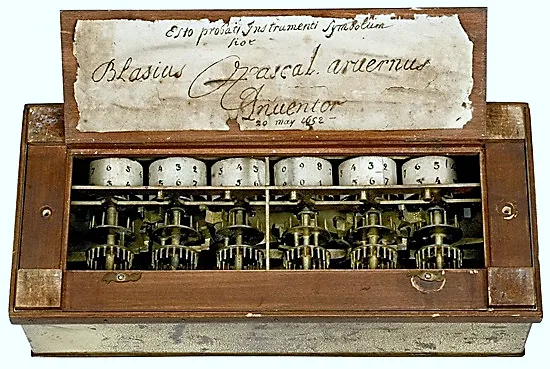
- The Pascaline (Pascal, 1642), Leibniz’s stepped reckoner (1673)
- Babbage’s Difference Engine (1822), Hollerith’s electric tabulating machine (1890)
- The Atanasoff–Berry Computer (ABC), Turing’s Bombe (breaking Enigma)
History of Computers
Charles Babbage and the Analytical Engine
- Charles Babbage (1791–1871): English mathematician and inventor.
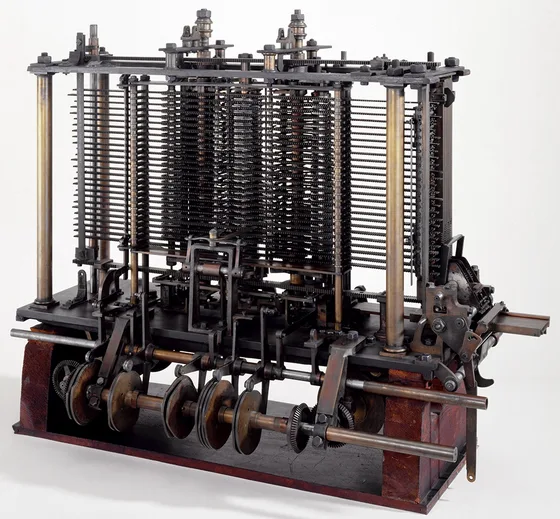
- In 1837 he designed the Analytical Engine: the first design for a general-purpose, programmable computer.
- It could compute and store results, and could be programmed for different calculations.
- The parts of today's computer were already there: the store (memory), the mill (processor), punched-card input and printer output.
- Punched cards came from the Jacquard loom (1804), whose patterns were set by cards.
- It was never finished in Babbage’s lifetime, but it is seen as the forerunner of modern computers.
History of Computers
Ada Lovelace: The First Program
- Ada Lovelace (1815–1852): English mathematician and writer.
- In 1843 she translated an article on the Analytical Engine and added her own notes.
- In “Note G” she gave a step-by-step method for the engine to compute Bernoulli numbers: regarded as the first computer program.
- She brought mathematical thinking and programming together scientifically; she is seen as the first programmer.
History of Computers
A Short History of the Computer
- 1945 · Stored program: program and data share one memory; since a program is data too, an input can be the description of another program.
- Von Neumann architecture: the processor reads instructions from memory in order; processor, memory and I/O talk over the address, data and control buses.
The timeline is evenly spaced; it does not show the real gaps between years.
History of Computers
The First Electronic Computers: ABC and Colossus
- John Atanasoff and Clifford Berry, Iowa State University, 1937–1942.
- Regarded as the first electronic digital computer; its logic circuits used vacuum tubes.
- It worked with numbers in binary (0/1).
- Memory: capacitors on rotating drums.
- Not programmable: it only solved systems of linear equations (fixed program).
- Tommy Flowers and his team, Bletchley Park (England), 1944.
- The first programmable electronic digital computer, programmed with switches and plugs.
- It broke encrypted enemy messages in World War II.
- It used about 1600 vacuum tubes: far faster and more flexible than mechanical devices.
- It contributed greatly to the progress of computing.
History of Computers
The Electronic Valve: Vacuum Tube
- An evacuated glass tube: a heated cathode emits electrons, the anode collects them.
- A small voltage on the grid between them turns the current on or off: the tube acts as an electronic switch (on = 1, off = 0).
- With no moving parts it switches thousands of times faster than mechanical relays.
- Drawbacks: it runs hot, uses a lot of power and fails often.
History of Computers
ENIAC and EDVAC
- John Mauchly and J. Presper Eckert, University of Pennsylvania (USA).
- The first large-scale general-purpose electronic computer.
- About 17,500 vacuum tubes instead of mechanical parts: faster.
- About 5000 additions per second; large computations such as artillery firing tables.
- It stored numbers in decimal; programming meant replugging cables by hand.
- Its design was described in John von Neumann’s 1945 report; it was fully running by 1951.
- Unlike ENIAC, it used binary.
- It kept program and data in the same memory (stored program).
- Instructions ran in order, with conditional jumps.
- This design is the von Neumann architecture, the basis of today's computers.
History of Computers
The General-Purpose Computer
- Programmable to fit the user's needs; designed for a wide range of applications.
- Used in business, education, entertainment and more. Changing the program adapts it to new tasks: the same laptop plays music one minute and compiles Java the next.
- It consists of a processor, memory and input/output units. The processor processes data according to instructions and produces results.
History of Computers
Early Programs
- Early programs were mostly mathematical calculations, for scientific and military uses.
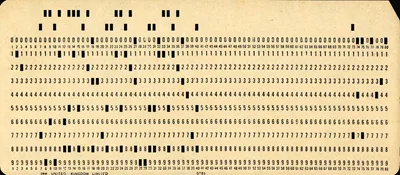
- Programs and data were entered on punched cards: the holes in each column encode one character.
- The first widely used high-level language, Fortran (Formula Translation), was developed at IBM under John Backus and released in 1957.
- Fortran was widely used for scientific computing, and still is.
K = I + J; a compiler turns them into machine instructions. Java (1995) is a high-level language too.Turing Machines
The Universal Turing Machine
- An abstract, general-purpose model of a computer defined by Alan Turing in 1936; one of the most fundamental models in computer science.
- It takes the description of another Turing machine as input and simulates that machine.
- So it can solve every computable problem. It is the theoretical basis for modern computers being universally programmable.
The stored-program computer and the universal Turing machine are two key milestones of computing.
Turing Machines
The Parts of a Turing Machine
Rule format: (state, read) → (write, direction, new state). Example: (q0, 0) → (1, right, q0).
Turing Machines
Example: A Turing Machine That Flips Bits
| # | State, read | Write, move, state |
|---|---|---|
| 1 | q0, 0 | 1, right, q0 |
| 2 | q0, 1 | 0, right, q0 |
| 3 | q0, □ | halt |
Just three rules: every 0 becomes 1, every 1 becomes 0; it halts at a blank cell.
Start: state q0, head on cell 0. The tape holds 0110.
Read 0 at cell 0 → rule 1: write 1, move right.
Read 1 at cell 1 → rule 2: write 0, move right.
Read 1 at cell 2 → rule 2: write 0, move right.
Read 0 at cell 3 → rule 1: write 1, move right.
Read □ → rule 3: the machine halts. The tape now holds 1001.
This rule table is the machine’s “program”. A universal machine can read such a table from its tape and run it.
Turing Machines
Defining the Limits of Computation
- The Turing machine pins down precisely what computation is and where its limits lie.
- Church–Turing thesis: anything computable by a step-by-step method can be computed by a Turing machine.
- But not every problem is computable. Turing proved that no algorithm can correctly answer “Does this program ever halt?” (the halting problem) for every program.
- It is regarded as one of the most important scientific results of the 20th century.
Limits of Computers
The Limits of Computers
Thanks to technological progress, computers do complex calculations very fast. Still, every resource is limited.
Limits of Computers
The Limits Show Up in Java Too
public class Limits {
    public static void main(String[] args) {
        int max = Integer.MAX_VALUE;
        System.out.println(max);
        System.out.println(max + 1);  // overflow
        System.out.println(0.1 + 0.2);    // precision
        System.out.println(5 / 2);        // int division
    }
}
2147483647
-2147483648
0.30000000000000004
2
- An
inttakes 32 bits: its largest value is 231 − 1 = 2,147,483,647. Add one and it overflows, wrapping to the smallest value. - A
doublestores numbers in binary with about 15–16 digits of precision; 0.1 has no exact binary form. - Dividing two
ints gives anint: 5 / 2 = 2 (the fraction is dropped).
Limits of Computers
Machines and Technology
- Technology shapes people's lives, and machines are a big part of it.
- Machines work fast and efficiently, and their power has grown steadily since the Industrial Revolution. Yet the machines we can build have limits.
Kinds of Knowledge
Knowledge: Declarative and Imperative
Knowledge is the understanding that helps people or machines make sense of the world and solve problems. It comes in two forms:
| Declarative knowledge | Imperative knowledge | |
|---|---|---|
| Question | What is it? | How is it done? |
| Form | Definition, axiom, fact | Ordered instructions, recipe |
| Testing | Checked as true or false | Follow the steps, get the result |
| Square root | y is the square root of x if y·y = x | Babylonian method: guess, improve, repeat |
| Everyday example | “Cake is a dessert made of flour, sugar and eggs.” | A cake recipe: “Beat the eggs, add the flour, bake 35 min at 180 °C.” |
Kinds of Knowledge
Declarative Knowledge
- Knowledge stated explicitly; it can be checked as true or false.
- Expressed through axioms or definitions: it says what something is and how it is defined.
- It can also state facts: true, verifiable statements about the world (“Water boils at 100 °C” at sea level).
y is the square root of x ⇔ y · y = x and y ≥ 0.
With this definition we can test a guess: 4 · 4 = 16, so 4 is the square root of 16. But it doesn't say how to compute a square root: we can't get √2 directly from it.
Kinds of Knowledge
Imperative Knowledge: Square Roots by the Babylonian Method
Imperative knowledge is instructions for how to do something. The Babylonian method finds a square root step by step:
- Take x.
- Pick an initial guess y0 (e.g. y0 = 1).
- If yn² ≈ x, stop; the answer is yn.
- Otherwise compute a new guess: yn+1 = (yn + x / yn) / 2.
- Go back to step 3.
Why does it work? If y is too big, x / y is too small (or vice versa); their average is closer to the true root. Each round brings the guess closer.
| n | yn (x = 16) | yn² |
|---|---|---|
| 0 | 1.000000 | 1.000000 |
| 1 | 8.500000 | 72.250000 |
| 2 | 5.191176 | 26.948313 |
| 3 | 4.136665 | 17.111995 |
| 4 | 4.002258 | 16.018065 |
| 5 | 4.000001 | 16.000005 |
Five rounds give a value very close to 4.
Kinds of Knowledge · Code trace
The Babylonian Method in Java, Step by Step
We want the square root of x = 16 (a Java double shows 16 as 16.0).
Initial guess y0 = 1.
Condition: |y·y − x| = 15 > 0.001 → true, enter the loop.
The new guess is computed and printed: y = 8.5.
Condition: |y·y − x| = 56.25 > 0.001 → true, enter the loop.
The new guess is computed and printed: y = 5.1911764705882355.
Condition: |y·y − x| = 10.9483 > 0.001 → true, enter the loop.
The new guess is computed and printed: y = 4.136664722546242.
Condition: |y·y − x| = 1.112 > 0.001 → true, enter the loop.
The new guess is computed and printed: y = 4.002257524798522.
Condition: |y·y − x| = 0.0180653 > 0.001 → true, enter the loop.
The new guess is computed and printed: y = 4.000000636692939.
Condition: |y·y − x| ≈ 5.1·10⁻⁶ ≤ 0.001 → false, the loop ends.
The result is printed: not exactly 4, but a very close approximation.
double x = 16;   // find its square root
double y = 1;    // initial guess y0
while (Math.abs(y * y - x) > 0.001) {
    y = (y + x / y) / 2;   // new guess
    System.out.println(y);
}
System.out.println("Square root ≈ " + y);
Kinds of Knowledge
Greatest Common Divisor (GCD): Two Definitions
The GCD of two numbers is the largest positive integer that divides both. Example: the divisors of 12 are 1, 2, 3, 4, 6, 12; of 18, 1, 2, 3, 6, 9, 18 → GCD(12, 18) = 6.
Kinds of Knowledge
Euclid's Algorithm
The steps
- Take two positive integers a and b (a ≥ b).
- Divide a by b and call the remainder r: r = a mod b.
- If r = 0, stop: GCD = b.
- Otherwise set a to b and b to r.
- Go back to step 2.
| a | b | r = a mod b |
|---|---|---|
| 48 | 18 | 12 |
| 18 | 12 | 6 |
| 12 | 6 | 0 |
48 = 2·18 + 12, 18 = 1·12 + 6, 12 = 2·6 + 0 → GCD(48, 18) = 6.
Kinds of Knowledge · Code trace
Euclid's Algorithm in Java, Step by Step
a = 48, b = 18 (a ≥ b).
Remainder: 48 % 18 = 12 (48 = 2·18 + 12).
r = 12 ≠ 0 → enter the loop.
a ← b: a = 18.
b ← r: b = 12.
New remainder: 18 % 12 = 6.
r = 6 ≠ 0 → enter the loop.
a ← b: a = 12.
b ← r: b = 6.
New remainder: 12 % 6 = 0.
r = 0 → the condition is false, the loop ends.
The last divisor b = 6 is the answer: GCD(48, 18) = 6.
int a = 48, b = 18;   // a >= b
int r = a % b;        // remainder
while (r != 0) {
    a = b;
    b = r;
    r = a % b;
}
System.out.println("GCD = " + b);
Algorithms and Problems
Algorithms
- An algorithm is a step-by-step method for solving a problem: a recipe listing the steps to follow.
- It says how to do a task and helps simplify complex problems.
- It is the basis of every program: programming is expressing algorithms in a programming language.
- Computer science is largely the design and analysis of algorithms.
- A good programmer can choose and implement the right algorithm for a problem.
- states its steps clearly,
- puts them in a logical order,
- terminates after finitely many steps,
- aims to solve the problem.
A well-designed algorithm is correct and efficient. The word comes from the 9th-century mathematician al-Khwarizmi.
Algorithms and Problems
Input, Process, Output
- First define clearly what the program or algorithm must do: its steps and output.
- Specifying a problem has two parts:
- Input: the data needed to solve the problem.
- Output: the result, the information we want.
To define a problem, ask What? Who? Where? When? How? Why? “Compute the grade average” is vague: without knowing how many grades there are, their weights and whether the result is whole or decimal, your program may solve the wrong problem.
Feedback: adjusting the input or process based on the output (e.g. a thermostat measures the temperature and switches the heater on or off).
Algorithmic Operations
Kinds of Algorithmic Operations
Every algorithm is built from three kinds of operations. They exist in every programming language, form the basic structure of algorithms and help keep complexity under control.
Algorithmic Operations
Iteration: Repeating Actions
- Repeats some actions until the loop condition becomes false; handy for walking through lists and processing data.
while: condition first, then body
While i > 0, add 1 to s and subtract 1 from i.
while i > 0 do
    set s to s + 1
    set i to i - 1
int s = 0, i = 3; while (i > 0) { s = s + 1; i = i - 1; }
repeat … until: body first
Print k and increment it until k is greater than n.
repeat
    print k
    set k to k + 1
until k > n
int k = 1, n = 3; do { System.out.println(k); k = k + 1; } while (k <= n);
Java has no repeat … until; its counterpart is do … while with the condition negated: “until k > n” = “while k ≤ n”. For k = 1, n = 3 the output is 1, 2, 3. If the body never makes the condition false, the loop runs forever; stop a stuck program with the IDE’s stop button or Ctrl+C in the console.
Summary
Summary
| Concept | Key point |
|---|---|
| Programming / computation | Giving the computer instructions / processing data with math and logic to produce a result. |
| Computer science | Logic, problem solving and creativity; technology is only a tool. |
| Fixed / stored program | Function built into hardware / program in memory, changeable (EDVAC, von Neumann). |
| Turing machine | Tape + head + rules; computes everything computable, but not every problem is computable. |
| Declarative / imperative | “What is it?” (definition, testing) / “How is it done?” (steps: Babylonian, Euclid). |
| Algorithm, pseudocode | Finite, ordered, clear steps; fix the input and output first, then write the steps. |
| Kinds of operations | Sequence (in order), selection (if/else), iteration (while, do-while, for). |
| Loop | Condition + body; the body must eventually make the condition false, or the loop is infinite. |
Summary
Common Mistakes
int a = 5 → error: ';' expected. Pseudocode is relaxed; in Java every statement ends with ;.= and ==if (x = 5) → error: incompatible types: int cannot be converted to boolean. Comparison is ==.int sum; System.out.println(sum); → error: variable sum might not have been initialized.5 / 2 = 2, 9 / 5 = 1. For a decimal result write 5 / 2.0 or 5.0 / 2.nextDouble() expects “1,75”; typing “1.75” throws an InputMismatchException.Summary
Sample Problems
- Which is declarative and which imperative? (a) “A number is even if it is divisible by 2.” (b) “Divide the number by 2; if the remainder is 0, print ‘even’.”
- Find GCD(84, 36) with Euclid's algorithm. How many divisions does it take?
- Compute two steps of the Babylonian method for √10 starting from y0 = 3.
- Write the input, output and pseudocode of a program that averages three grades. What is the output for 40, 75, 90?
- In the
whileexample, starting from s = 0, i = 5, how many times does the loop run, and what are s and i at the end? - How many steps does the bit-flipping Turing machine take on the tape 1010, and what is left on the tape?
Show answers
- (a) declarative: it defines what evenness is. (b) imperative: it says how to decide.
- 84 mod 36 = 12, 36 mod 12 = 0 → GCD = 12; 2 divisions.
- y1 = (3 + 10/3) / 2 ≈ 3.166667; y2 = (y1 + 10/y1) / 2 ≈ 3.162281 (√10 ≈ 3.162278).
- Input: n1, n2, n3; output: the average. Read the three grades → divide the sum by 3.0 → print:
68.33333333333333(dividing by 3 gives 68). - 5 times; at the end s = 5, i = 0.
- 4 write steps + halting on □ = 5 steps; the tape holds 0101.
Summary
Exercises
- Write a program converting Celsius to Fahrenheit (F = C · 9/5 + 32). What does
int f = 9 / 5 * c + 32;give for c = 25? - Write pseudocode that prints the largest of three numbers.
- Compute the sum 1 to n with a
whileloop. What is it for n = 10? - Trace GCD(1071, 462) with Euclid's algorithm as a table.
- The tape holds a unary number (111 = 3). Write the rules of a Turing machine that appends a 1.
- Write pseudocode that finds the smallest item in a list. Why must the starting value be the first item and not 0?
Answers / hints
9 / 5= 1 (integer division): the result is 57, not 77. Fix:c * 9.0 / 5 + 32→ 77.0.- max ← a; if b > max then max ← b; if c > max then max ← c; print max.
while (k <= n) { sum += k; k++; }(sum = 0, k = 1) → 55.- (1071, 462, 147) → (462, 147, 21) → (147, 21, 0) → GCD = 21.
- (q0, 1) → (1, right, q0); (q0, □) → (1, right, halt). Result: 1111.
- min ← first item; for each item, if item < min then min ← item. Starting at 0 would wrongly give 0 for an all-positive list like {4, 2, 7}.
Summary
References
- J. V. Guttag, Introduction to Computation and Programming Using Python, 3rd ed., MIT Press, 2021 (Chapter 1: declarative and imperative knowledge).
- A. B. Downey and C. Mayfield, Think Java, 2nd ed., O’Reilly, 2019 (Chapter 1: programming and problem solving).
- R. Sedgewick and K. Wayne, Computer Science: An Interdisciplinary Approach, Addison-Wesley, 2016 (Turing machines, computability).
- C. Petzold, Code: The Hidden Language of Computer Hardware and Software, 2nd ed., 2022.
- A. M. Turing, “On Computable Numbers, with an Application to the Entscheidungsproblem”, Proc. London Math. Society, 1936.
- H. M. Deitel and P. J. Deitel, Java: How to Program, 11th ed., Pearson, 2017.
- Oracle, The Java Tutorials: “Language Basics”, docs.oracle.com/javase/tutorial.