
Multi-Function Display
Published:
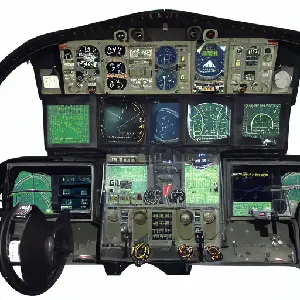
A Multi-Function Display, usually called an MFD, is one of the cockpit systems that interests me because it brings many different kinds of information onto a single screen. Instead of giving every function its own instrument, the display can change according to what the pilot needs at that moment.
Where the idea came from
Military aviation adopted the concept first. The F-16 Fighting Falcon, which entered service in 1978, was among the earliest production aircraft to replace a set of dedicated analogue gauges with a small cathode-ray tube that could display different information depending on the mode selected. The capability was limited by early CRT technology, but the principle proved itself: a reconfigurable display could show what the mission currently required rather than showing everything all the time.
Commercial aviation followed with the Boeing 737 Classic series in 1984, which introduced an Electronic Flight Instrument System (EFIS) using CRT screens for the primary flight display and navigation display. The Boeing 777 (1995) extended this further with a fully glass cockpit — six large LCD screens replacing the hundreds of individual round instruments that had filled earlier widebody flight decks.
General aviation reached the same capability more recently. The Garmin G1000 integrated avionics suite, introduced in 2003, brought a full glass cockpit with primary and multifunction displays to light aircraft at a price that made it practical for training fleets and private owners. For a student pilot in 2008, it is increasingly likely that training will happen in an aircraft equipped with this kind of display rather than round-gauge analogue instruments.
What the MFD shows
Navigation is one of its most important roles. An MFD can show a moving map, the aircraft’s position, waypoints, routes, airports, terrain, and airspace boundaries. When these elements are shown together, the pilot can understand the flight visually. A route becomes something that can be seen in relation to terrain and traffic rather than read as a sequence of headings and distances.
Weather radar is another valuable function. The display can overlay precipitation intensity from airborne radar on the map, showing which areas along the planned route should be avoided. For a pilot, the important question is not simply “What is the weather?” but “How does this weather affect my route and my next decision?” Integrating the answer with the navigation picture makes that question much easier to answer.
Aircraft systems information — engine parameters, fuel levels, electrical bus status, hydraulic pressures — can appear on separate pages. A single screen becomes a systems panel when needed and a navigation display when not. This is the key advantage: the same hardware serves multiple roles without requiring additional panel space.
The human factors problem
The multiple-page design saves space but creates a challenge: the pilot must be able to reach the needed information quickly under pressure. Major avionics manufacturers — Garmin, Honeywell, and Rockwell Collins (whose Pro Line systems are standard in business aviation) — invest significant effort in cockpit human factors, determining which information must always be visible, which can be buried in a submenu, and what the reversionary mode should look like when a display fails.
Declutter modes reduce the map to only the most essential elements when the pilot is busy. Reversionary modes display critical flight information on a single remaining screen if others fail. The design must work for a pilot who is tired, distracted, or dealing with an abnormal situation — not just for demonstration in a simulator.
That is why I think the MFD is more than a screen. It is a meeting point between electronics, software, aircraft systems, and human factors. The technology is impressive, but the real goal is simple: help the pilot understand the aircraft and the situation more quickly and clearly.